Introduction
File Transfer Protocol (FTP) is a standard method used to upload, download, and manage files on a web server. Creating an FTP account in cPanel allows you to grant access to specific users so they can manage website files securely without sharing the main cPanel credentials.
Prerequisites
Before creating an FTP account in cPanel, ensure the following:
- You have valid cPanel login credentials
- Access to your hosting account
- A clear idea of the directory/folder you want the FTP user to access
- A strong password for security purposes
- (Optional) An FTP client like FileZilla to access the account after creation
Implementation
Step 1:
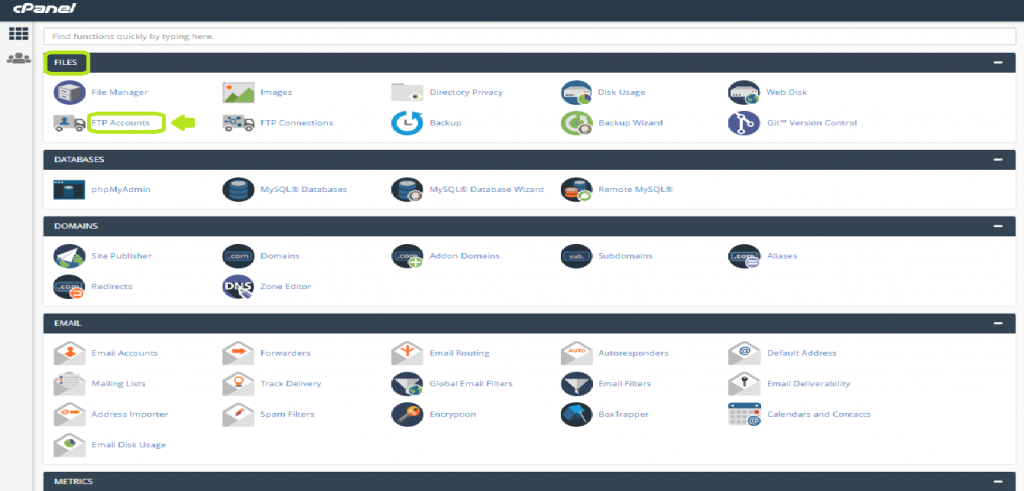
Login to your cPanel account and in the FILES section, you can find the option “FTP Accounts“.
Click on it to open.
Step 2:
A new interface will be opened.
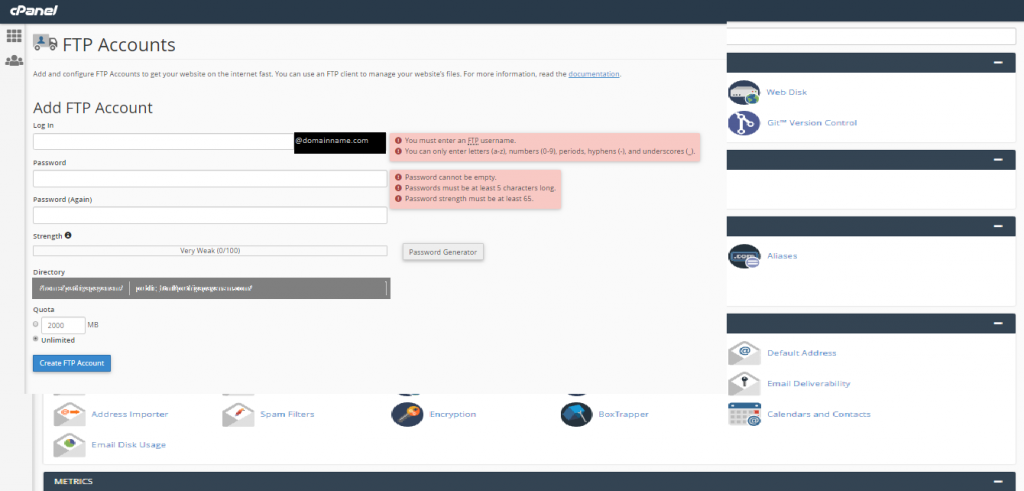
In the Log In field, enter a username for your FTP account. The username will be accompanied along with your domain name to use.
For Example, if your username you are providing is 'test' and the domain name is 'example.com', then your FTP account username will be test@domain.com
Step 3:
In the Password field, enter the password that is highly secured.
And in the Password(Again) field you need to re-enter the password for confirmation.
Otherwise, use the Password Generator button which is always recommended to create a highly secured password.
Step 4:
Then you will find the field Directory. This field allows you to set the access level of the user.
Here you can mention the directory name that you want the user to access. The user will be able to access all the files and sub-folders inside that directory only.
By default, it will automatically display a directory name. You can replace it with your own directory name.
If you mention only / in the field, it means that the user can have full access to the home directory.
Step 5:
Then in the Quota field, you can either manually provide the storage space limit in the text box or if you want it not to have limited storage, then you can select the Unlimited option.
Step 6:
Click on Create FTP Account button.
Congratzz!!! You have successfully created an FTP account on your cPanel server.
You can find the list of FTP accounts created under the section “FTP Accounts“.

If there are more FTP accounts, you can search the account name in the search bar.
Conclusion
Creating an FTP account in cPanel is a simple and effective way to manage file access for your website. It helps improve security by limiting access to specific directories and avoids sharing your main login details. Once set up, users can easily connect using an FTP client and manage files efficiently.