Introduction
cPanel provides different interface styles (themes) that control how the user dashboard looks and behaves. Changing the cPanel style helps improve usability, user experience, and accessibility based on client preference or hosting provider standards. Common styles include modern interfaces like Jupiter, which is the default in newer cPanel versions.
Prerequisites
Before changing the cPanel style, ensure the following:
- WHM root access or reseller-level access (depending on scope)
- Valid cPanel/WHM login credentials
- List of available cPanel themes (installed on the server)
IMPLEMENTATION
Step : 1
Login to your cPanel.
Step : 2
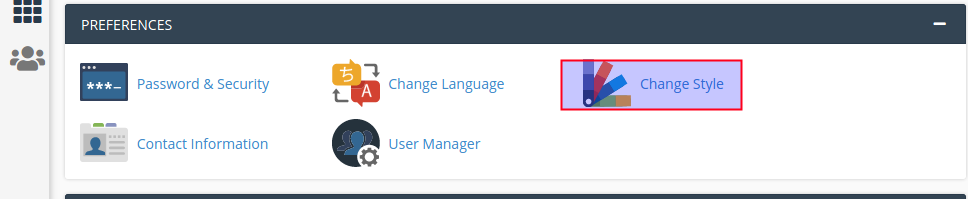
Click change style icon under the preferences section.
Step : 3
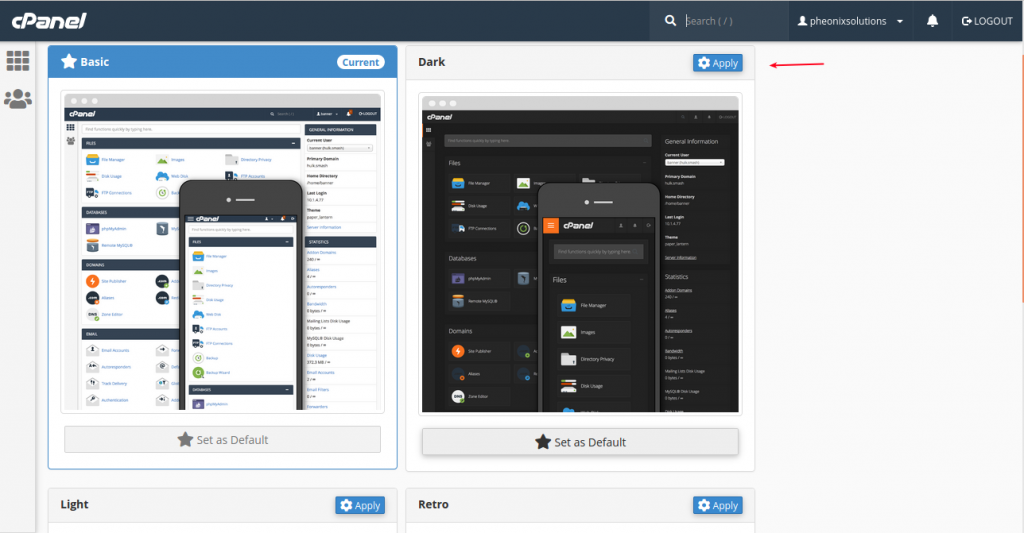
Choose the style and click the apply button.
Conclusion
Changing the cPanel style is a simple administrative task that enhances the user interface experience for hosting users. It can be performed either from WHM for multiple accounts or directly from the cPanel interface for individual users. Ensuring the correct theme selection helps maintain consistency and improves overall usability across hosting environments.