Introduction
Hotlink Protection in cPanel helps prevent other websites from directly linking to files such as images, videos, or documents hosted on your server. This protects your bandwidth usage, improves website performance, and prevents unauthorized use of your content.
Prerequisites
Before enabling Hotlink Protection, make sure you have:
- Access to your cPanel account
- Permission to manage website security settings
- A hosted domain or website in your cPanel account
- The file types you want to protect (such as jpg, jpeg, png, gif, mp4, pdf)
- Optional redirect URL for unauthorized requests
Implementation
Follow the steps below to configure Hotlink Protection in cPanel:
Step : 1
Login to your cPanel.
Step : 2
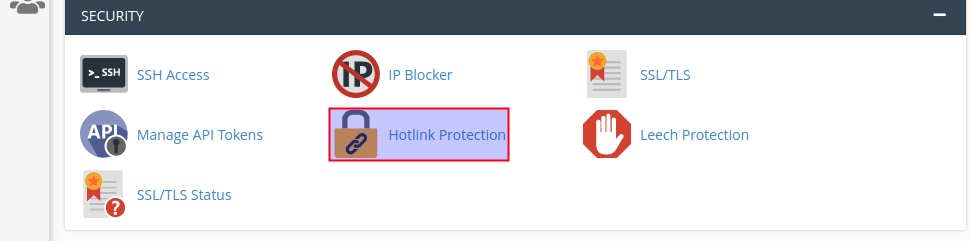
Click hotlink protection under the security section.
Step : 3
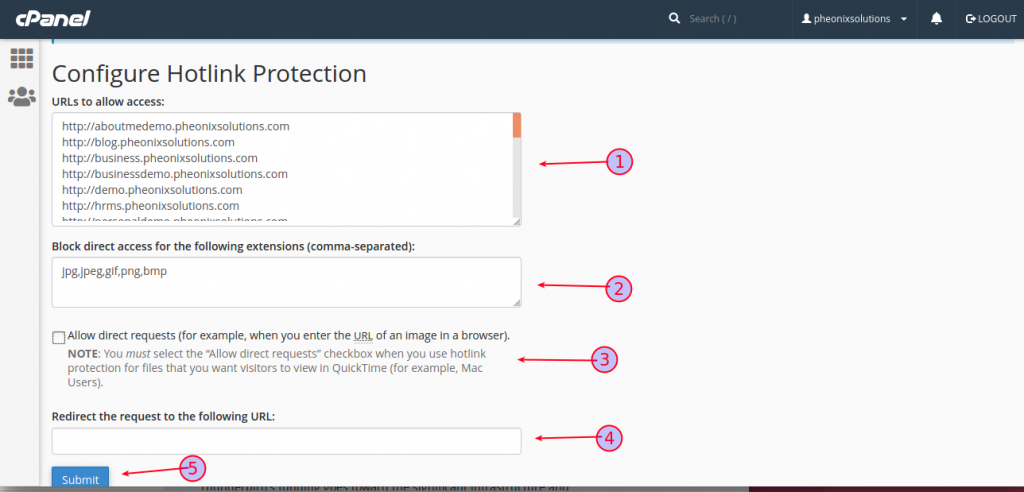
- Select the URL.
- Enter the files type you want to protect.
- Choose allow direct request option.
- Edit redirect request URL.
- Finally click submit button.
Conclusion
You have successfully configured Hotlink Protection in cPanel. This feature helps secure your website content, reduce unnecessary bandwidth usage, and prevent external websites from using your hosted files without permission.