Introduction
WHM allows server administrators to enable and manage FTP services for cPanel accounts. By selecting and configuring an FTP server such as Pure-FTPD or ProFTPD, users can securely upload and manage website files through FTP clients.
Prerequisites
Before proceeding, ensure the following:
- You have root access to the WHM panel.
- WHM and cPanel services are running properly.
- Required firewall ports for FTP are allowed on the server.
Implementation
Step 1: Log in to the WHM portal.
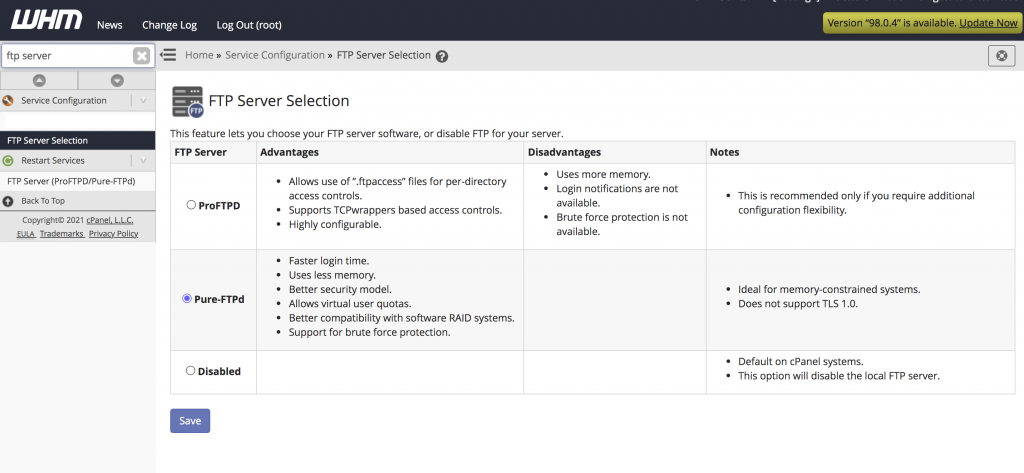
Step 2: Type FTP Server in the search box and click on FTP Server Selection under the Service Configuration. You can select Pure-FTPD or Pro-FTPD to enable FTP accounts. Click the Save button at the bottom of the page to activate your selection.
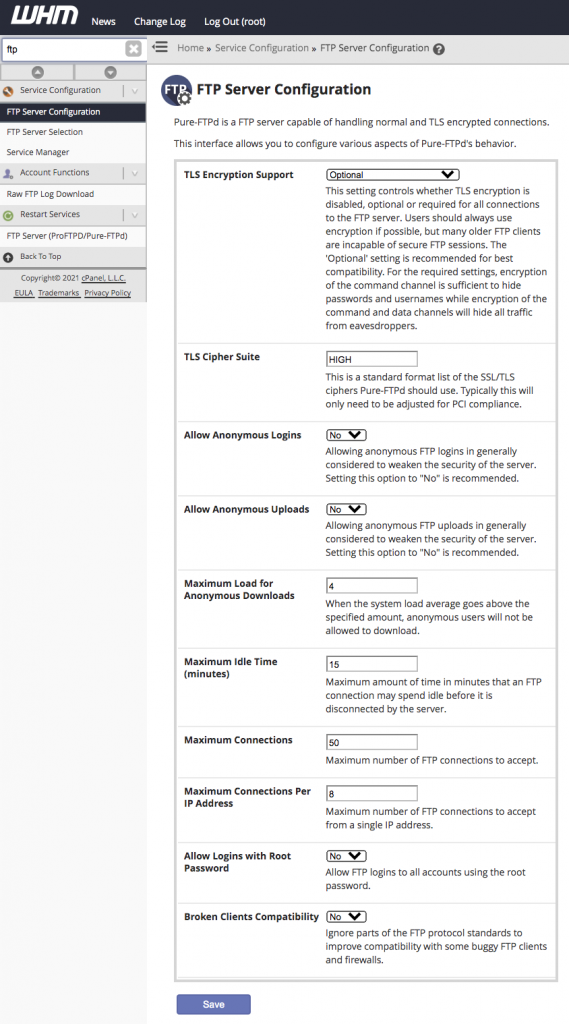
Step 3: If you want to edit the FTP server configuration to change the settings, navigate to FTP Server Configuration under the Service Configuration and modify the settings. Click the Save button to change the settings.
Now you can see the FTP options in your cPanel account’s dashboard.
Conclusion
Enabling FTP access in WHM allows cPanel users to securely manage website files using FTP clients. Proper FTP configuration helps ensure reliable file transfers and better account management.