Introduction
Databases are a critical part of most websites, especially for applications like WordPress, Joomla, Magento, and custom PHP sites. Over time, a database can become corrupted due to server crashes, incomplete queries, or improper shutdowns.
In cPanel, you can quickly repair MySQL databases using built-in tools without needing advanced command-line skills.
Prerequisites
Before repairing a database in cPanel, ensure the following:
- You have valid cPanel login credentials
- The hosting account has MySQL/MariaDB database access
- You know the database name that needs repair
- You have taken a full backup (very important)
- Your hosting provider has not restricted database repair privileges
IMPLEMENTATION
How to repair a Database in the cPanel account
Date: 30-08-2021
Step 1: Log in to the cPanel account.
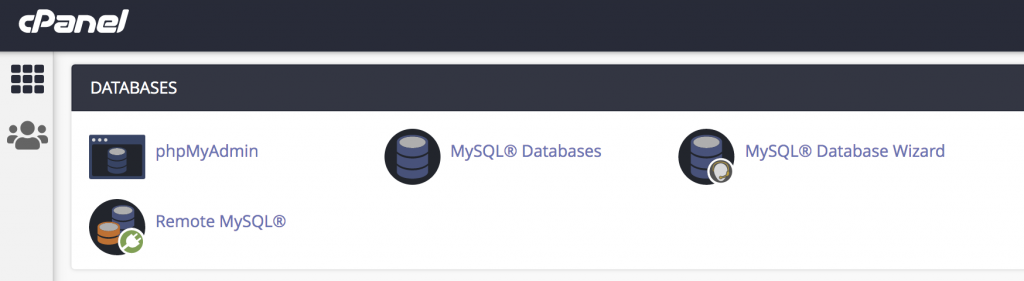
Step 2: Click on MySQL Databases under the DATABASES section.
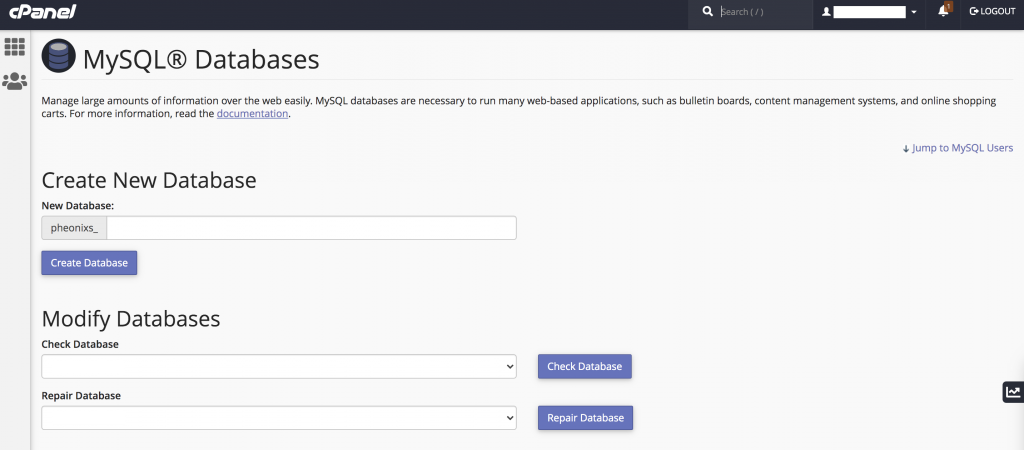
Step 3: Select the database you want to repair in the Repair Database drop-down box under Modify Databases and then click Repair Database.
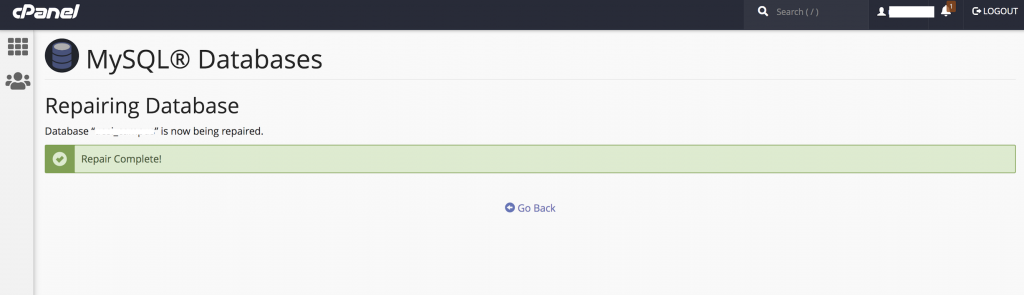
Step 4: You can see the database repaired.
Thank you!
Conclusion
Repairing a database in cPanel is a simple yet powerful way to resolve corruption issues without technical complexity. Using either the MySQL Databases tool or phpMyAdmin, you can restore database integrity and ensure your website functions smoothly.
However, it is always recommended to maintain regular backups and monitor database health to prevent future issues.