Introduction
WHM (WebHost Manager) is a server administration interface used by hosting providers to manage multiple cPanel accounts. One common administrative task is identifying suspended accounts, which are temporarily disabled due to billing issues, policy violations, or manual action. Suspended accounts can be viewed both from the WHM graphical interface and via command-line tools.
Prerequisites
Before listing suspended accounts, ensure you have:
- Root access or WHM reseller privileges
- Access to WHM panel or SSH terminal
- A server running cPanel/WHM
- Basic knowledge of Linux commands
- SSH access enabled (for CLI method)
IMPLEMENTATION
WHM Panel:
Step 1: Log in to the WHM portal.
Step 2: Type List Suspended in the search box. Click on List Suspended Accounts under Account Information. You can see the suspended accounts list.
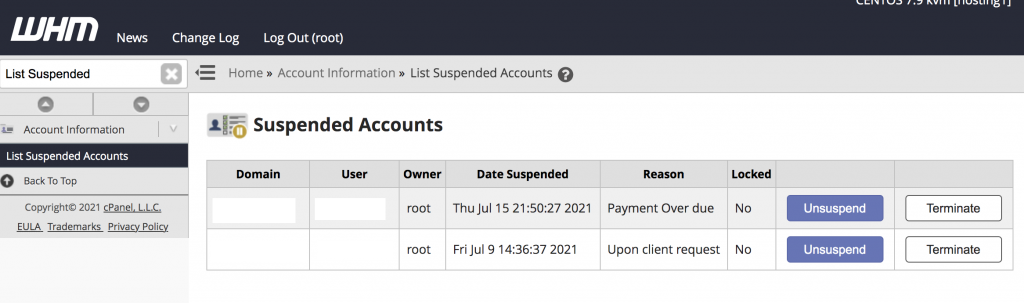
Note:- If you want, you can unsuspend the accounts from here directly.
Command-Line:
Step 1: Log in to the server via SSH as root.
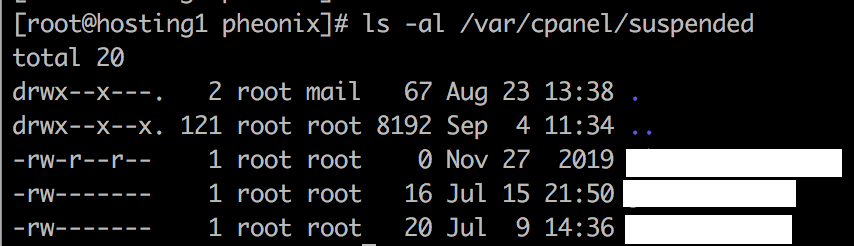
Step 2: All suspended accounts will be listed in the directory of “/var/cpanel/suspended/“. Use the below command to list the suspended accounts.# ls -al /var/cpanel/suspended/
Thank you!
Conclusion
Listing suspended accounts in WHM is an essential administrative task for monitoring server health and enforcing hosting policies. The WHM interface provides an easy GUI-based view, while SSH commands and WHM API methods offer faster and more automated ways to retrieve the same information, especially useful for large servers or scripting tasks.