Introduction
WordPress Toolkit is a powerful feature available in hosting control panels like cPanel/Plesk that allows users to manage WordPress websites easily. It provides options to install, clone, secure, update, and also delete WordPress sites from a single dashboard. Deleting a site using WordPress Toolkit ensures that both the WordPress files and database can be removed cleanly, helping free up server space and maintain a clean hosting environment.
Prerequisites
Before deleting a WordPress site using WordPress Toolkit, make sure:
- You have full administrative access to the hosting control panel
- You are logged into WordPress Toolkit
- You have taken a full backup of the website (files + database)
- You have confirmed the correct site/domain is selected for deletion
- No active business or production traffic depends on the site
IMPLEMENTATION
Procedure
- Access WordPress Toolkit within cPanel.
- Select the site you wish to remove.
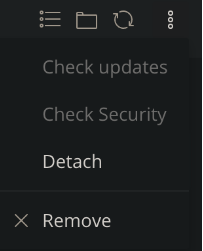
- Click on the options icon on the far right.
- Click the Remove option.
5. Confirm you wish to remove the site from WordPress Toolkit.
Conclusion
Deleting a site using WordPress Toolkit is a simple but critical operation that helps manage hosting resources efficiently. However, it should always be done carefully after verifying backups and ensuring the site is no longer required. Proper deletion ensures clean server management and prevents unnecessary storage usage.