Introduction
WordPress Toolkit is a powerful management interface that allows administrators to install, configure, secure, and manage WordPress websites directly from WHM. The toolkit can be easily installed through the WHM Marketplace.
Prerequisites
- Root access to WHM
- Active internet connection on the server
- Access to the WHM Marketplace
Implementation
Step 1
Log in to WHM as the root user.
Step 2
Navigate to:
Server Configuration → WHM Marketplace
Step 3
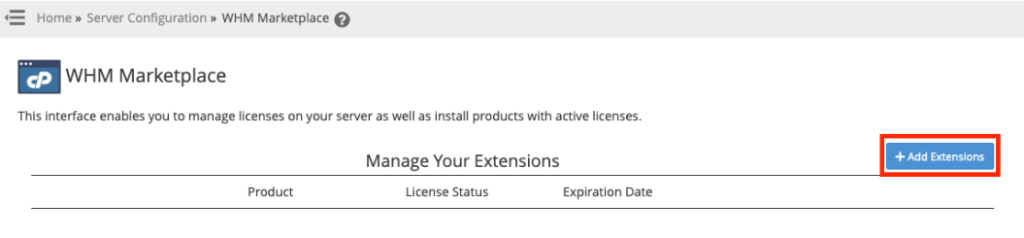
On the WHM Marketplace page, click the Add Extensions button located in the upper-right corner.
Step 4
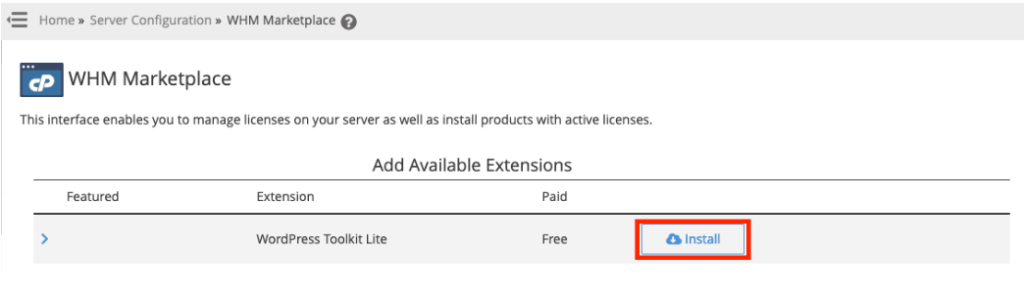
From the list of available extensions, locate WordPress Toolkit.
Step 5
Click the Install button next to WordPress Toolkit.
Step 6
Wait for the installation process to complete successfully.
Once the installation is finished, WordPress Toolkit will be available for use on the server.
Conclusion
Installing WordPress Toolkit through the WHM Marketplace provides an easy way to manage WordPress websites directly from WHM. The installation process requires only a few steps and can be completed directly from the WHM interface.