Introduction
Hotlink Protection is a security feature available in cPanel that helps prevent other websites from directly linking to files hosted on your website, such as images, videos, and other media content. Enabling this feature helps reduce unauthorized bandwidth usage and protects your website resources from external misuse.
Prerequisites
Before proceeding, ensure that:
- You have access to your cPanel account.
- The website is actively hosted on the server.
- The files you want to protect are hosted within your cPanel account.
Implementation
Step 1: Log in to cPanel
Access your cPanel account using your credentials.
Step 2: Open Hotlink Protection
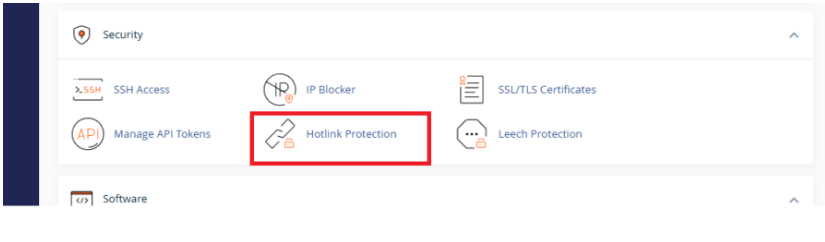
Navigate to the Security section and click Hotlink Protection.
Step 3: Configure Allowed URLs
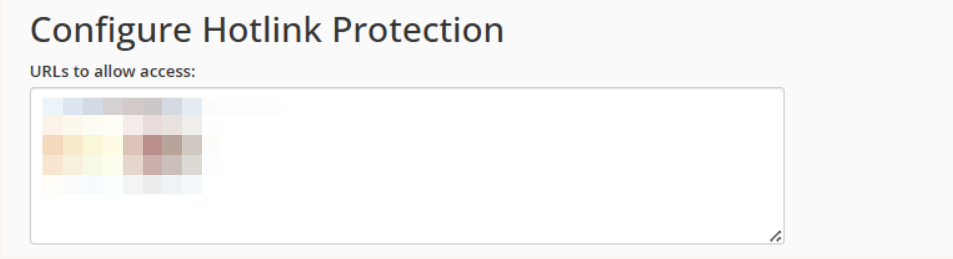
Review the domains listed under URLs to allow access and ensure that your website domain is included.
Step 4: Configure Direct Access Requests
Select whether direct requests to files should be allowed based on your requirements.

Step 5: Review Protected File Extensions
Verify the file extensions that should be protected, such as JPG, JPEG, PNG, GIF, and other media file types.

Step 6: Enable Hotlink Protection
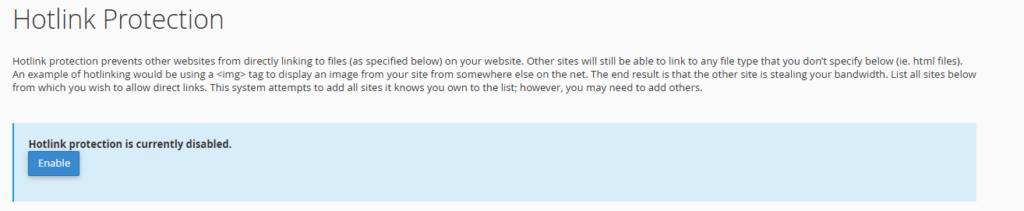
Click Enable to activate Hotlink Protection for your website.
Conclusion
Hotlink Protection is an effective way to prevent unauthorized websites from using your hosted media files. By enabling this feature in cPanel, you can reduce bandwidth consumption, improve resource management, and protect your website content from external usage.