
Post Date: December 05, 2020
Last Updated: November 20, 2026
Introduction
How to Add Domain Alias in Plesk is a common requirement when managing multiple domain names for a single website. A domain alias allows you to associate an additional domain name with an existing primary domain and display the same website content without creating a separate website. Plesk also provides options to configure DNS, mail services, web services, and HTTP 301 redirection for domain aliases.
This guide explains how to add and remove domain aliases in Plesk, configure domain alias settings, and manage multiple domain names using the Plesk control panel.
Prerequisites
Before adding or removing a domain alias in Plesk, ensure you have the following:
- Access to the Plesk control panel.
- Valid login credentials with administrator or domain management permissions.
- A registered domain name that you want to configure as an alias.
- Access to the domain’s DNS settings to configure the necessary DNS records, if required.
- An existing primary domain hosted on the Plesk server.
How to Add a Domain Alias in Plesk
To add a domain alias in Plesk, log in to the Plesk control panel and navigate to the Websites & Domains section. Follow the steps below to configure a new domain alias for your primary domain.
Step 1: Log in to your Plesk account.
Step 2: Navigate to the Websites & Domains section and locate the domain alias you want to remove.

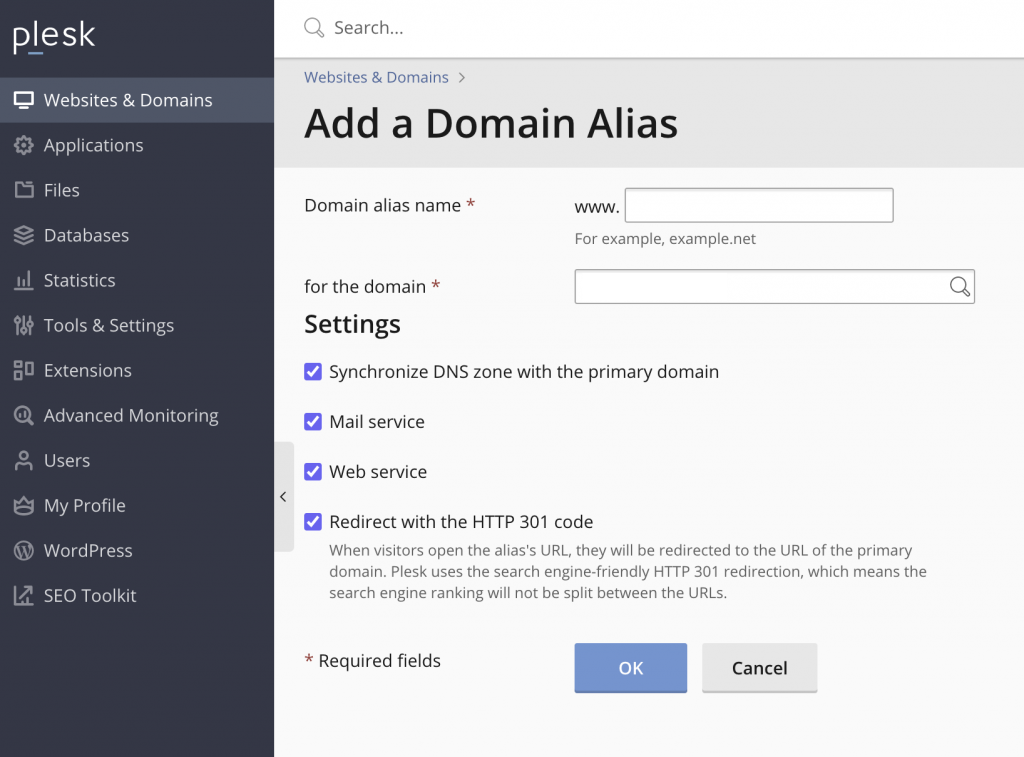
Step 3: Enter your Domain alias name in the text box and select the main domain name for the domain section. If the alias domain wants to use the main domain DNS zone, Mail, Web services, and Redirect with the HTTP 301 code, you need to select the below checklists and click on the OK button. Now you have added the domain alias successfully.
Need Help with Plesk Domain Alias Configuration?
Need assistance with adding domain aliases, configuring DNS settings, or managing domains in Plesk? Contact the Pheonix Solutions team for professional support.
Contact Pheonix Solutions Support
How to Remove Domain Alias in Plesk
Step 4: If you want to remove the added Alias domain names, click on the Remove button. You have removed the domain alias successfully.
Conclusion
Adding and removing domain aliases in Plesk is a simple process that allows you to manage multiple domain names for a single website. By following this guide, you can learn how to add a domain alias in Plesk, configure the required settings, and remove an existing domain alias when it is no longer needed.
Proper Plesk domain alias configuration helps simplify domain management and makes your website accessible through additional domain names without maintaining separate website content.
Following the steps outlined in this guide, you can easily add a new domain alias or remove an existing one through the Plesk control panel.
FAQs
1. What is a domain alias in Plesk?
A domain alias allows you to associate an additional domain name with an existing primary domain. Visitors accessing the alias domain will be directed to the same website.
2. Can I add multiple domain aliases to a single domain in Plesk?
Yes, Plesk allows you to add multiple domain aliases to a single primary domain, provided your hosting plan and server configuration support it.
3. Do I need to create a separate hosting account for a domain alias?
No, a separate hosting account is not required. A domain alias uses the existing website configuration of the primary domain.
4. Can I enable mail services for a domain alias?
Yes, you can enable mail services for a domain alias while adding it, provided the required options are supported and configured in Plesk.
5. What is the purpose of HTTP 301 redirection when adding a domain alias?
HTTP 301 redirection permanently redirects visitors from the alias domain to the primary domain. It also helps search engines understand which domain should be treated as the preferred website address.
Official Plesk Documentation
Related Articles
How to Enable HTTP to HTTPS Redirect for Your Website in Plesk
How to Export a Database in Plesk
Need Assistance?
Managing domain aliases and configuring domain settings in Plesk can sometimes require additional technical support. Our team can help you with Plesk configuration, DNS management, and website hosting requirements.
Explore our Pheonix Solutions website to learn more about our hosting and infrastructure services.