
NODE JS FILE SYSTEM MODULE
Date posted :02/05/2019
In this blog we are going to see about nodejs file modules and how to read create, update and delete the files.
INTRODUCTION:
Nodejs file system used to work with the file system on your computer.
File system module use the require() methods.
FILE SYSTEM MODULES
- Read the file
- create the file
- update the file
- delete the file
<html style="background: deepskyblue;">
<body>
<h1>Welcome to Nodejs</h1>
<p>This is my first file operation</p>
</body>
</html>
Create the html file for read the data. And save it as test.html
Read Files:
1)fs.readFile()
This function used to read the file.
var http = require('http');
var fs = require('fs');
http.createServer(function (req, res) {
  fs.readFile('test.html', function(err, data) {
    res.writeHead(200, {'Content-Type': 'text/html'});
    res.write(data);
    res.end();
  });
}).listen(8080);
Create the nodejs file and save it as testread.js.
Then run the following code in to your terminal. You can get the following out put.
>> node testread.js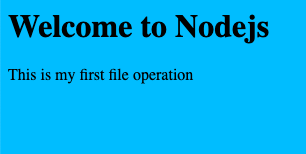
CREATE A FILE:
1)fs.appendFile()
This method appends specified content to the end of the file.
var fs = require('fs');
fs.appendFile('mynewfile1.txt', 'Hello content!', function (err) {
   if (err) throw err;
   console.log('Saved!');
 });
2)fs.open()
This method takes a “flag” as the second arguments,w for write,the file is opened for writing.
If not exist empty file will create.
var fs = require('fs');

fs.open('mynewfile2.txt', 'w', function (err, file) {
  if (err) throw err;
  console.log('Saved!');
});
3)fs.writeFile()
The above method create the new file file1 and save the content “Hello content”.
var fs = require('fs');

fs.writeFile('mynewfile3.txt', 'Hello content!', function (err) {
  if (err) throw err;
  console.log('Saved!');
});
UPDATE FILES:
1)fs.appendFile()
This method append the text end of the file.
var fs = require('fs');

fs.appendFile('test', ' This is my text.', function (err) {
  if (err) throw err;
  console.log('Updated!');
});
2)fs.writeFile()
This method used to replace the content of the file.
var fs = require('fs');

fs.writeFile('mynewfile3.txt', 'This is my text', function (err) {
  if (err) throw err;
  console.log('Replaced!');
});
DELETE FILE:
1)fs.unlink()
This method used to delete the file.
var fs = require('fs');

fs.unlink('filename.txt', function (err) {
  if (err) throw err;
  console.log('File deleted!');
});
Thanks for using pheonixsolutions.
You find this tutorial helpful? Share with your friends to keep it alive.
Really Great, your effort of writing a value able piece of content. i learned something new and i got some new ideas. Thanks Dear!!!