Introduction
cPanel is a widely used web hosting control panel that allows users to manage their websites, emails, domains, and server settings. Keeping your cPanel password secure and updating it regularly is essential to protect your hosting account from unauthorized access. This guide explains how to change your cPanel password quickly and safely.
Prerequisites
Before you begin, ensure you have the following:
- Valid cPanel login credentials (username and current password)
- Access to your cPanel login URL (e.g.,
https://yourdomain.com:2083) - A strong new password (combination of uppercase, lowercase, numbers, and special characters)
IMPLEMENTATION
How To Change Your cPanel Password
Step : 1
Login to your cPanel.
Step : 2
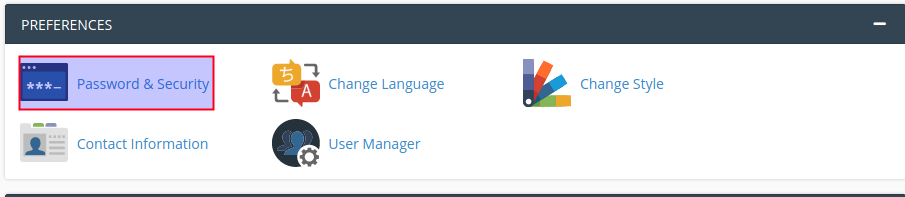
Click password & security icon under the preferences section.
Step : 3
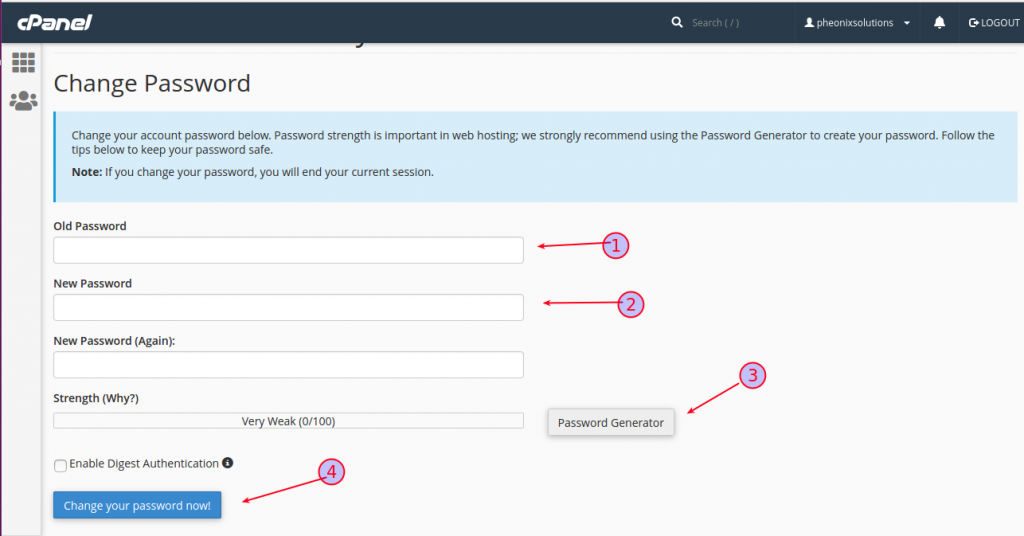
- Add old password.
- Add new password.
- You can also generate the password using “password generator”.
- Click “change your password now” button.
Conclusion
Changing your cPanel password is a simple but important security step. By regularly updating your password and using strong credentials, you can safeguard your website and hosting data from potential threats. Always store your password securely and avoid sharing it with unauthorized users.