Introduction
A Cron Job in cPanel allows you to schedule commands or scripts to run automatically at specific intervals. It is commonly used for tasks such as sending automated reports, cleaning temporary files, running backups, or executing scheduled scripts without manual intervention.
Prerequisites
Before creating a Cron Job, ensure you have:
- Access to your cPanel account
- Permission to manage Cron Jobs
- The full command or script path you want to execute
- A valid email address to receive Cron Job notifications (optional but recommended)
Implementation
Follow the steps below to configure a Cron Job in cPanel:
Step : 1
Login to your cPanel.
Step : 2
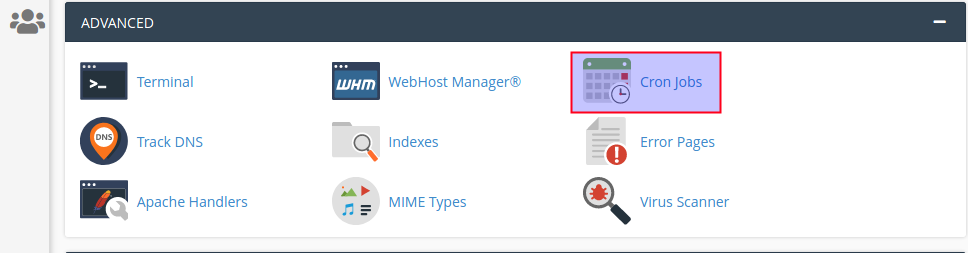
Click cron jobs icon under the advanced section.
Step : 3
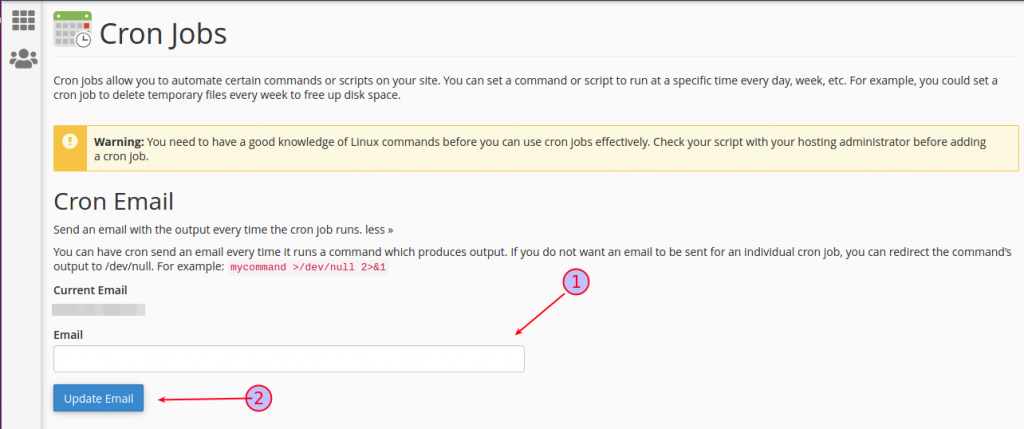
- Add email address.
- Click update email button.
Step : 4
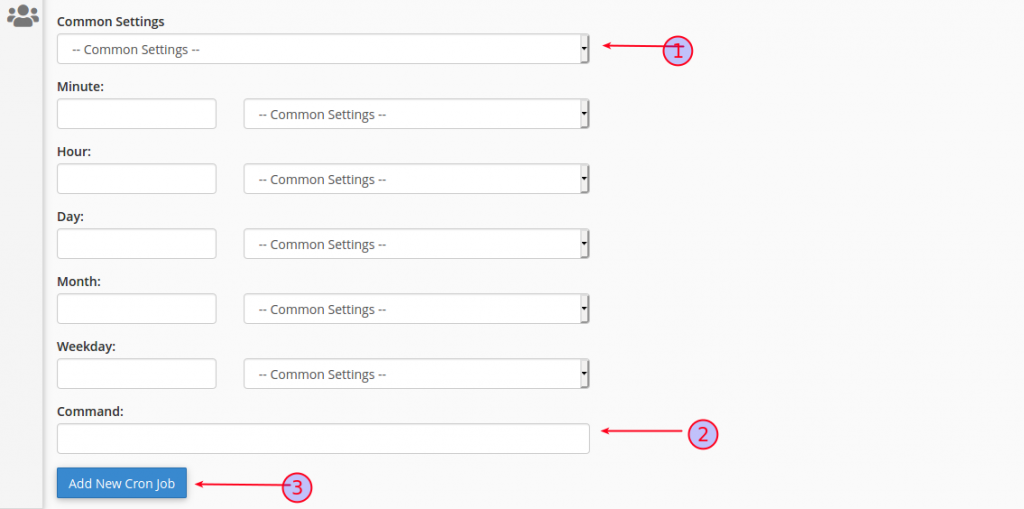
- Select the common settings.
- Add command.
- Finally click “Add new cron job” button.
Conclusion
You have successfully created a Cron Job in cPanel. The scheduled task will now run automatically based on the selected timing. Cron Jobs help automate repetitive tasks, save time, and improve website or server management efficiency.