Introduction
When managing domains in WHM/cPanel, you may encounter the error:
“The domain is already pointed to an IP address that does not appear to use DNS servers associated with this server.”
This issue typically occurs when a domain’s DNS is hosted externally (for example, with a third-party DNS provider or another server), while you’re trying to manage it within your current WHM server.
In simple terms, WHM expects the domain to use its own nameservers—but the domain is pointing somewhere else. This mismatch can prevent proper account creation or DNS configuration.
Fortunately, there are two straightforward ways to resolve this, depending on your setup.
Solution 1: Configure Remote Name Server IPs
This is the safest and most controlled method, especially if your DNS is intentionally hosted outside your WHM server.
Steps:
Click Save.
Log in to WHM.
Navigate to:
Home » IP Functions » Configure Remote Service IPs
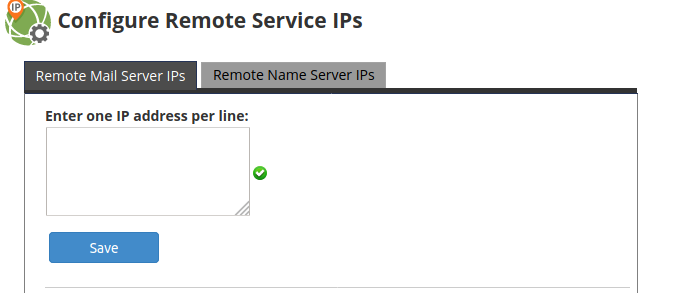
Click on the tab: “Remote Name Server IPs” (usually on the right side).
Enter the remote DNS server IP addresses (one per line).
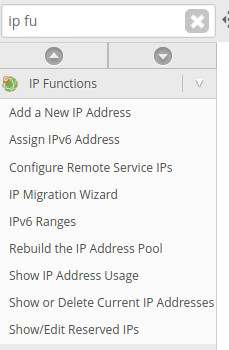
2) Then click on the second tab on the right “Remote Name Server IPs” and enter the domain’s remote DNS server IP address/es. You should enter one address per line. Then click on Save.
Solution 2: Enable “Allow Remote Domains
This method is quicker but less restrictive, as it allows WHM to accept domains regardless of their DNS configuration.
Steps:
Click Save.
Log in to WHM.
Go to:
Home » Server Configuration » Tweak Settings
Find the option: “Allow Remote Domains”
Set it to On.
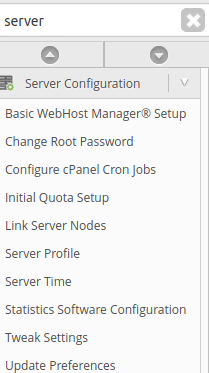
2) Find the “Allow Remote Domains” option.

3) Set it to On and click on Save.
Conclusion
This WHM error is not a critical failure—it’s simply a safeguard to ensure DNS consistency between your domain and server. By either registering the remote DNS server IPs or allowing remote domains, you can quickly resolve the issue and proceed with your setup.
For production environments, it’s best to choose the method that aligns with your infrastructure and security practices. A clear understanding of where your DNS is hosted will save time and prevent similar issues in the future.