Introduction
While creating a subdomain in cPanel, you may encounter the error:
You do not have permission to create subdomains of the server’s hostnameThis typically occurs when the subdomain you are trying to create matches or falls under the server’s hostname domain, which is restricted by default in Web Host Manager.
Cause
By default, WHM prevents users from creating subdomains that overlap with the server’s hostname domain for security and configuration reasons.
Prerequisites
Before proceeding, ensure:
- Root access to WHM
- Understanding of your server hostname and domain setup
Implementation
Step 1: Login to WHM
Access WHM using root credentials.
Step 2: Navigate to Tweak Settings
- Go to:
Home → Server Configuration → Tweak Settings
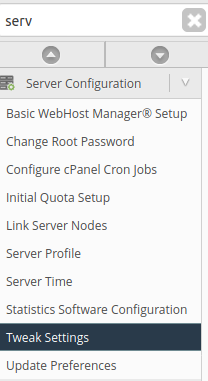
Step 3: Locate Required Option
Find the setting:
“Allow users to park subdomains of the server’s hostname”

Step 4: Enable the Option
- Set it to ON
- Click Save
Step 5: Retry Subdomain Creation
Go back to cPanel and try creating the subdomain again.
Conclusion
This error occurs due to WHM’s default restriction on hostname-related subdomains. By enabling the appropriate setting in Web Host Manager, you can resolve the issue and proceed with subdomain creation.