Introduction
The upload_max_filesize directive in PHP controls the maximum size of files that can be uploaded to a server. In a cPanel environment, this limit is important for websites that handle media uploads such as images, videos, backups, or large documents. If the limit is too low, users may encounter upload errors. cPanel provides easy tools to modify this setting without needing deep server-level configuration changes.
Prerequisites
Before changing upload_max_filesize, ensure the following:
- Access to cPanel account (or WHM if you manage multiple accounts)
- PHP version in use supports configuration changes (PHP 5.x and above)
- Permission to modify PHP settings via MultiPHP INI Editor or
.htaccess(if applicable) - Awareness of related limits such as:
post_max_sizememory_limit
- Backup or note of current PHP configuration (recommended)
IMPLEMENTATION
How to change php upload_max_filesize in cPanel Account
Date: 31-01-2021
Step 1: Login to the cPanel account.
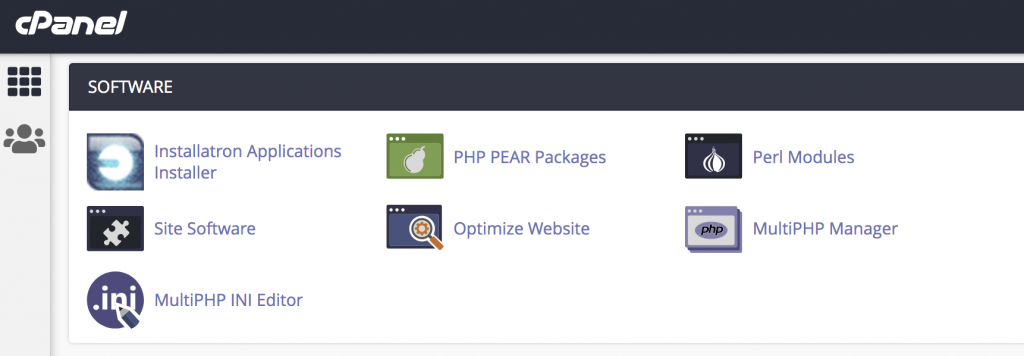
Step 2: Click MultiPHP INI Editor under the SOFTWARE section on the cPanel dashboard.
Step 3: Select the home directory or a domain’s document root to open the corresponding PHP configuration under the Configure PHP INI basic settings.
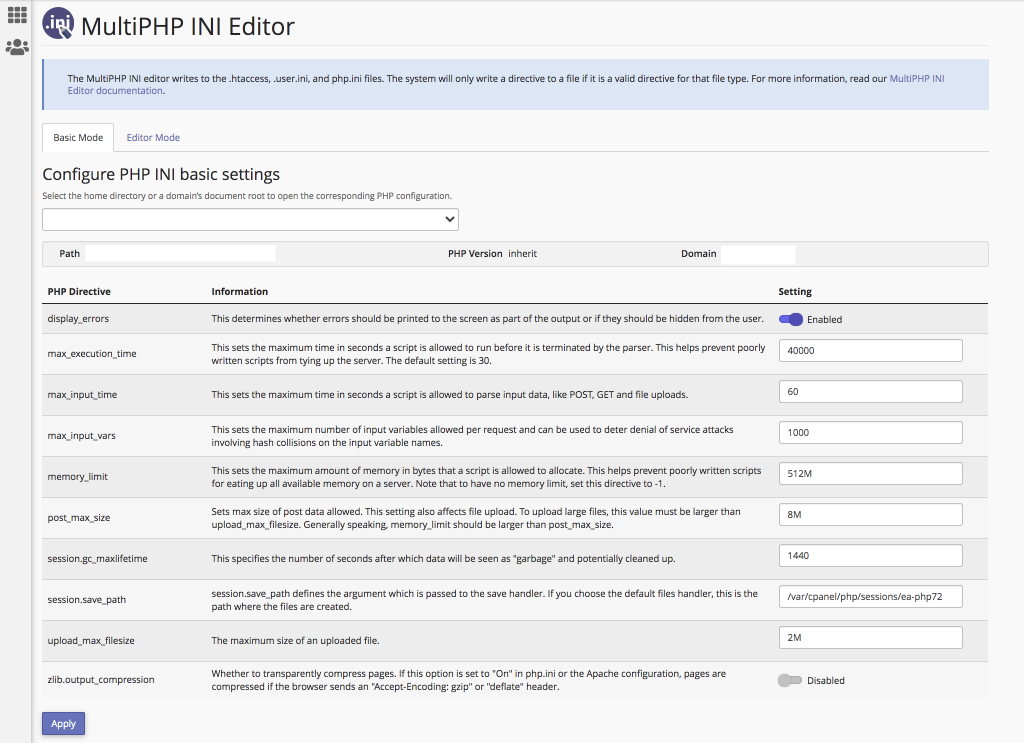
Step 4: Find the upload_max_filesize and enter the required maximum size of an uploaded file on the Setting section and click on Apply.
Thank you!
Conclusion
Changing upload_max_filesize in cPanel is a simple but important adjustment for improving website functionality, especially for applications requiring file uploads. By correctly setting this value along with related PHP limits, you ensure smoother uploads and better user experience. Always verify changes after updating and make sure other PHP limits are aligned to avoid unexpected upload issues.