Introduction
ConfigServer Security & Firewall (CSF) in WHM allows administrators to quickly block or allow IP addresses for server security and access management.
Prerequisites
- Root access to WHM
- ConfigServer Security & Firewall installed on the server
Implementation
How to Block/Allow IP Address with CSF in WHM
Step 1:
Log in to the WHM portal as the root user.
Step 2:
- Enter ConfigServer Security & Firewall in the search bar
- Click on the CSF option
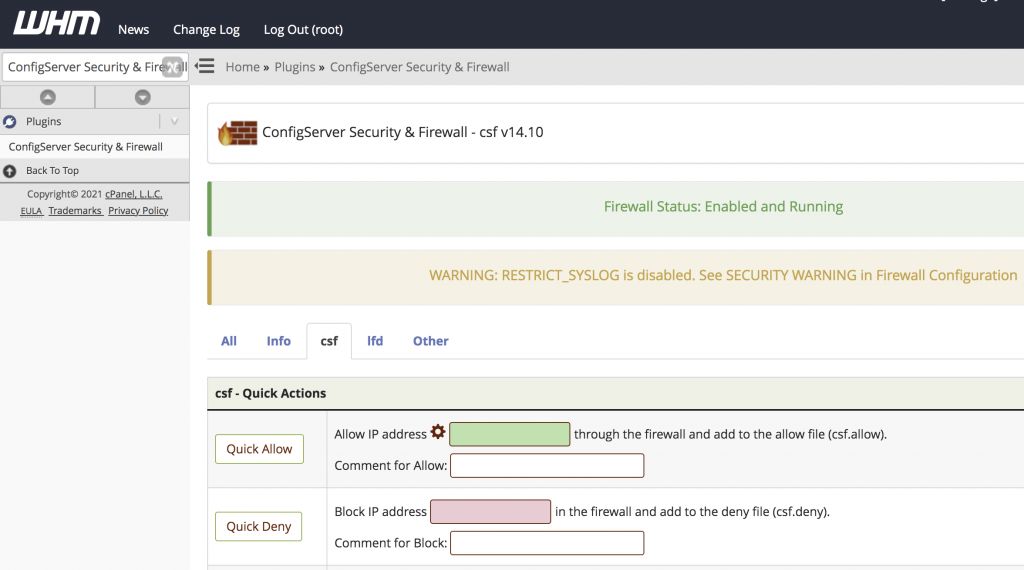
Step 3:
- To block an IP address:
- Enter the IP address in the pink-colored box
- Click Quick Deny
- To allow an IP address:
- Enter the IP address in the green-colored box
- Click Quick Allow
Conclusion
Using ConfigServer Security & Firewall in WHM, you can easily manage server access by quickly allowing or blocking IP addresses for improved server security