Introduction
WHM provides a Demo Mode feature that allows administrators to grant limited access to cPanel accounts. When Demo Mode is enabled, users can explore the cPanel interface without making changes that could affect the account or server configuration. This feature is useful for training, demonstrations, or testing purposes.
Prerequisites
Before proceeding, ensure that you have:
- Root access credentials for the WHM account.
- Administrative privileges to manage account settings within WHM.
Procedure
Step 1: Log in to your WHM account.
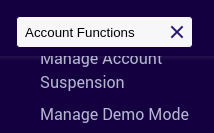
Step 2: Search for Account Functions on Search tools in the upper left of the Home page.

Step 3: Click Manage Demo Mode on the Account Functions section.
Step 4: Select the domain or user of an account from the list, or search for an account below.

Step 5: Click Modify in the bottom left, after selecting the domain or user.
Step 6: Then click Enable to enable the demo mode.
Conclusion
We have successfully enabled Demo Mode for a cPanel account through WHM. The account can now access the cPanel interface in a restricted mode, making it suitable for demonstrations, training, or evaluation purposes without allowing configuration changes.