
Google Maps Integration in Digital Highway
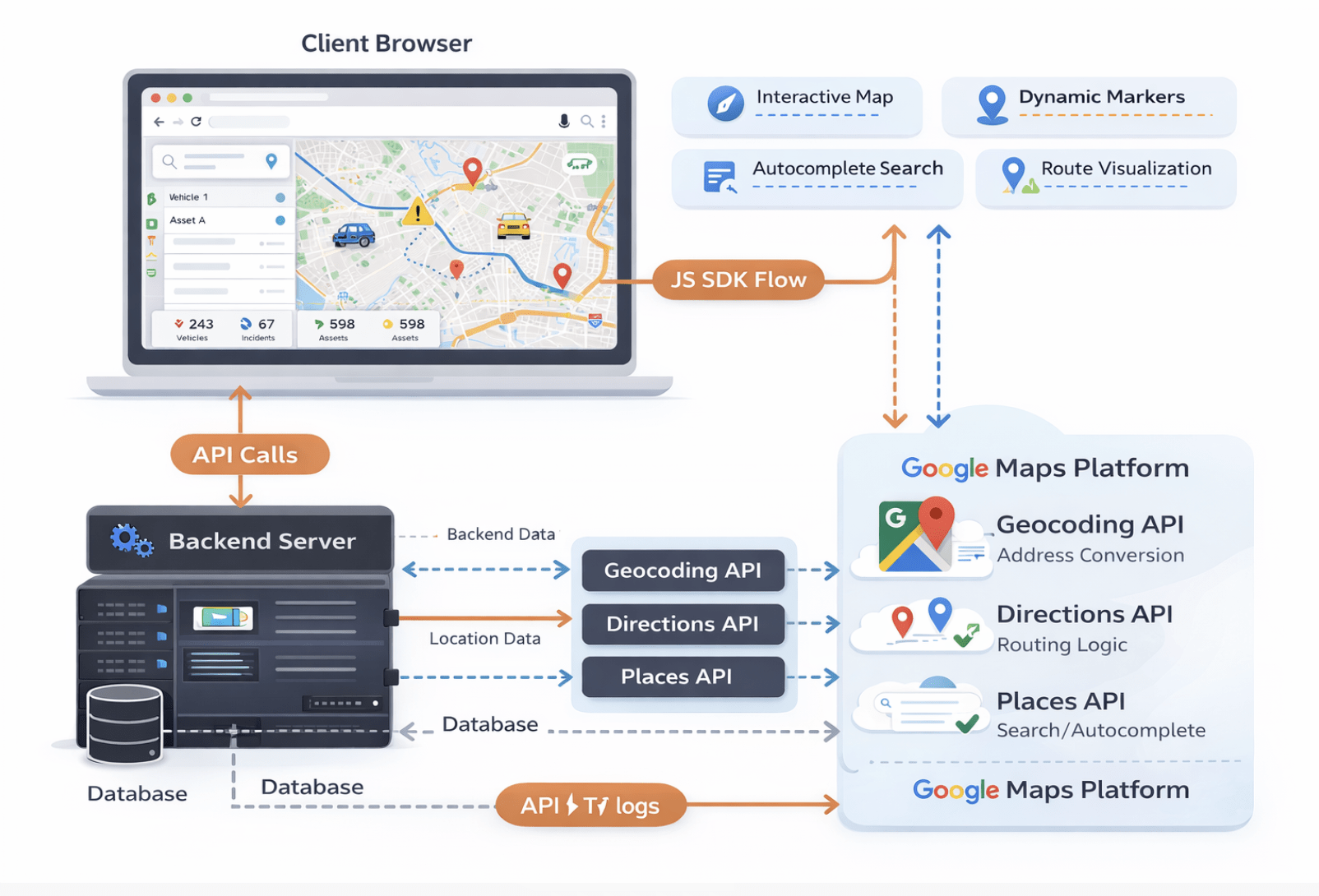
This guide outlines the architectural and technical approach for integrating Google Maps into the Digital Highway project.
1. Requirements
Functional Requirements
- Interactive Map Interface: Users must be able to view an interactive map with zoom and pan capabilities.
- Location Markers: Display dynamic markers for infrastructure assets, vehicles, or points of interest.
- Route Visualization: Draw polyline routes between origin and destination points.
- Real-time Tracking: (Optional) Update marker positions in real-time for moving assets.
- Search & Autocomplete: Allow users to search for places/addresses using Google Places API.
Additionally, these features improve user experience by enabling faster navigation and better location discovery.
Non-Functional Requirements
- Performance: Map load time should be under 2 seconds. Markers should render efficiently (clustering for large datasets).
- Responsiveness: Fully usable on mobile (iOS/Android) and desktop browsers.
- Reliability: 99.9% uptime (dependency on Google SLAs).
- Cost Efficiency: Optimized API usage to stay within budget constraints.
2. Pre-requisites
Before implementation, ensure the following are setup:
- Google Cloud Platform (GCP) Account: Project created in GCP Console.
- Billing Enabled: A billing account linked to the GCP project (required for Maps Platform).
- API Keys Generated:
- Maps JavaScript API (Client-side rendering)
- Directions API (Routing logic)
- Geocoding API (Address <-> Coordinate conversion)
- Places API (Search/Autocomplete)
- API Restrictions: Restrict keys by HTTP referrer (domain) to prevent unauthorized usage.
3. Solution
To integrate Google Maps into the Digital Highway project, firstly we evaluated three different approaches based on flexibility, performance, and scalability requirements. The Embed API is the simplest method, allowing maps to be added using an iframe with a fixed location; however, it offers very limited customization and is best suited only for static location displays such as contact pages. The Static Maps API generates map images (PNG/JPG) without interactivity, making it useful for lightweight use cases like emails, thumbnails, or low-bandwidth environments, but it cannot support dynamic features like tracking or routing. For our primary requirements — including interactive dashboards, real-time tracking, custom markers, route visualization, and advanced controls — the Maps JavaScript API was selected. It provides full programmability via JavaScript SDKs, enabling scalable, interactive, and feature-rich map integrations suitable for modern web applications.
4. High Level Design (HLD)
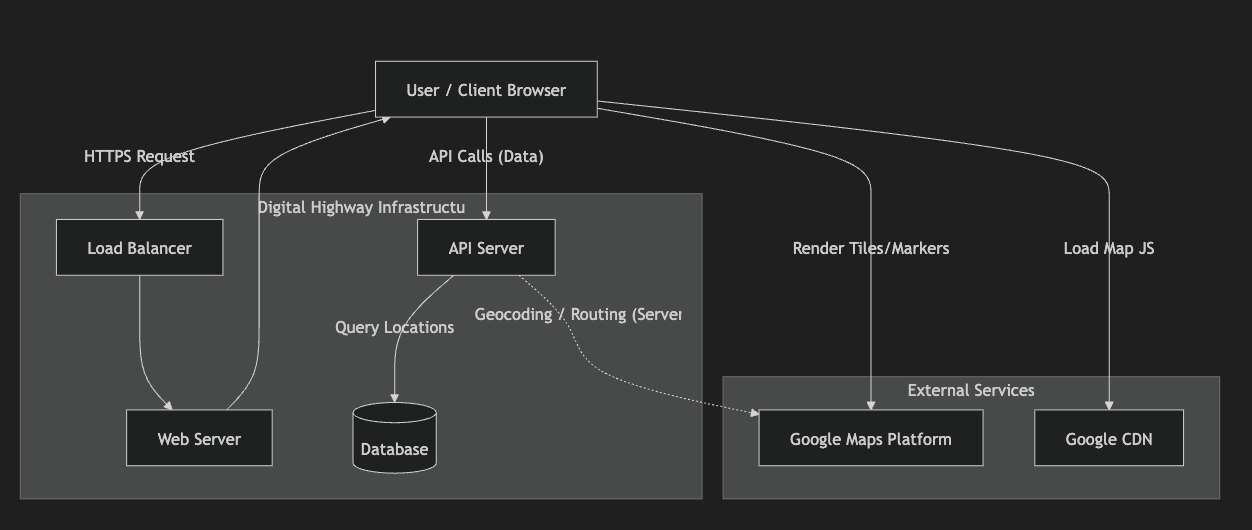
The system architecture follows a 3-tier design integrated with external Google Maps services, as illustrated in the diagram. The User/Client Browser initiates HTTPS requests that pass through a Load Balancer, which distributes traffic to the Web Server for handling web content and application entry points. For dynamic operations such as fetching location data, routing, or asset tracking, the browser makes API calls to the API Server, which processes business logic and queries the Database storing geospatial information. When geocoding or routing services are required, the API Server communicates with the Google Maps Platform externally. Meanwhile, the client browser directly loads the Google Maps JavaScript library from Google CDN and retrieves map tiles, markers, and visualization data from Google Maps Platform for rendering. This architecture ensures scalability, efficient traffic handling, secure backend data management, and smooth interactive map visualization for the Digital Highway application.
The system follows a standard 3-tier architecture extended with external map services.
5. Low Level Design (LLD)
Data Architecture
We need to store geospatial data. In MySQL 8.0+ or PostgreSQL, we use spatial types.Table: locations
CREATE TABLE locations (
id BIGINT PRIMARY KEY AUTO_INCREMENT,
entity_type ENUM('vehicle', 'asset', 'incident'),
details JSON, -- Custom properties
coordinates POINT NOT NULL SRID 4326, -- Geospatial storage
address VARCHAR(255),
created_at TIMESTAMP DEFAULT CURRENT_TIMESTAMP,
 SPATIAL INDEX(coordinates) -- Critical for performance
);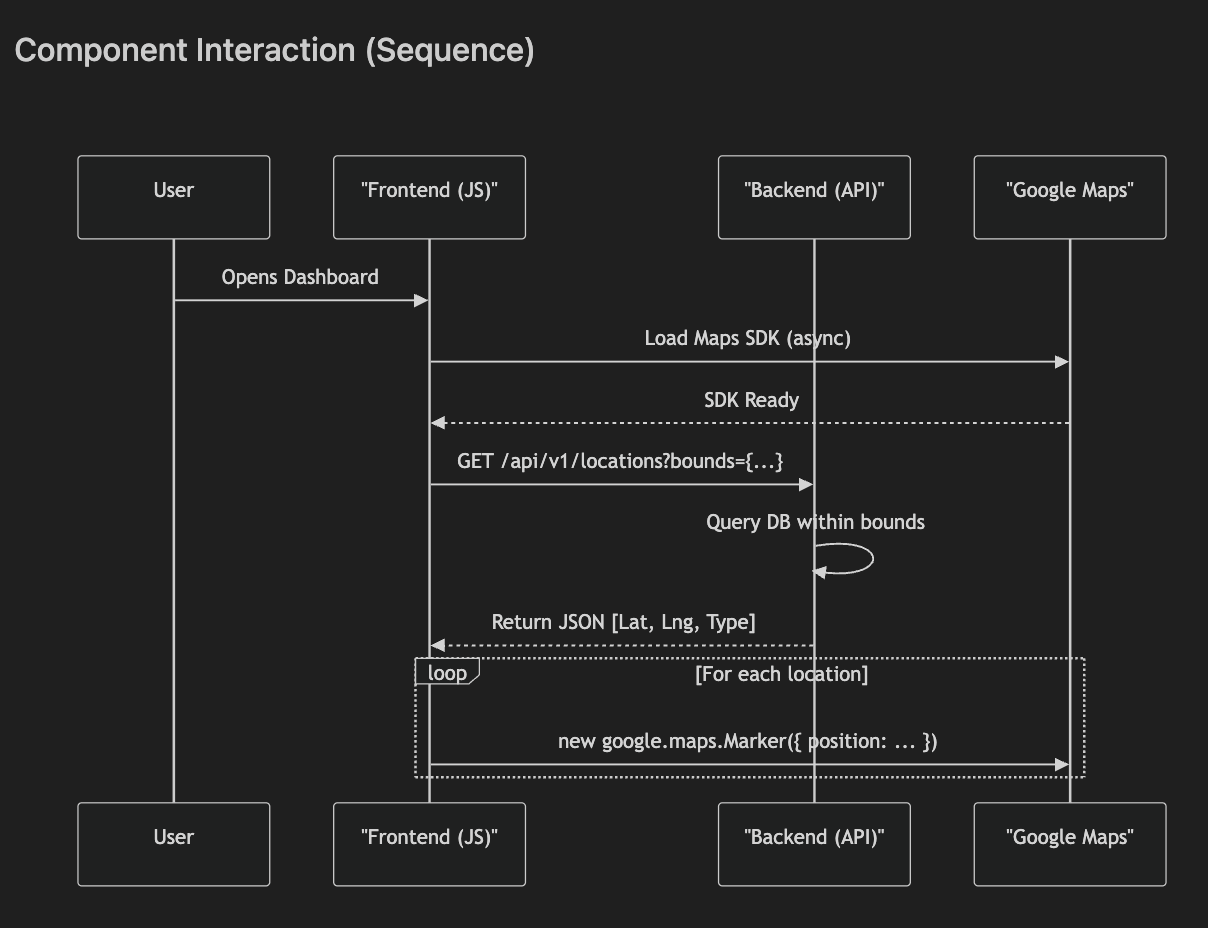
The sequence diagram illustrates how different components interact during map loading and location visualization. When a user opens the dashboard, the frontend application (JavaScript) asynchronously loads the Google Maps SDK to ensure the page remains responsive. Once the SDK is ready, the frontend sends an API request (e.g., /api/v1/locations?bounds={…}) to the backend server to fetch location data within the visible map bounds. The backend queries the database containing geospatial records and returns structured JSON data including latitude, longitude, and entity type. The frontend then iterates through each returned location and dynamically creates map markers using the Google Maps JavaScript API. This workflow enables efficient loading, optimized database querying, and smooth real-time visualization of assets or locations on the Digital Highway map interface.
6. Tech Stacks
Frontend:
- Framework: React.js / Vue.js or Laravel Blade.
- Library: @googlemaps/js-api-loader (for robust async loading).
Backend:
- Framework: Laravel / Node.js.
- Geo-tools: grimzy/laravel-mysql-spatial (if using Laravel) or standard PostGIS drivers.
Database:
- MySQL 8.0 (with spatial support) or PostgreSQL (PostGIS).
7. Challenges
Cost Management: Google Maps is pay-as-you-go. High traffic can spike costs.
- Mitigation: However, proper API optimization and caching strategies can significantly control these expenses. Implement caching, use Static Maps for list views, and apply strict quota limits in GCP Console.
Map Load Latency: Heavy maps can slow down the initial paint.
- Mitigation: Asynchronous loading (defer), lazy loading map components only when visible.
Marker Clustering: Rendering 1000+ markers crashes browsers.
- Mitigation: Client-side clustering (e.g., MarkerClusterer library) to group nearby points.
8. FAQ
Q: Is Google Maps API free?
A: No, but you get a $200 monthly credit (approx. 28,000 map loads/month) which is often enough for startups.
Q: Can we use OpenStreetMap (OSM) instead?
A: Yes, via Leaflet or Mapbox. It is cheaper/free but lacks the rich POI data and Street View features of Google.
Q: How do we handle offline usage?
A: The standard JS API does not support offline mode. For offline needs, we would need to cache tile images (violates TOS) or use specific mobile SDKs with limited offline capabilities.
Q: Can we customize map styles and themes?
Q: How secure are Google Maps API keys?
A: API keys should always be restricted by domain (HTTP referrer), IP address, or application type. This prevents unauthorized usage and unexpected billing.
A: Yes. Google Maps allows custom styling (dark mode, minimal maps, branded colors) using Map Style JSON or Cloud-based styling.
Q: How do we handle large numbers of markers?
A: Use marker clustering libraries (e.g., MarkerClusterer) to group nearby markers. This improves performance and prevents browser slowdowns.
Q: What happens if API quota exceeds limits?
A: Requests may fail or return errors. To avoid this, implement caching, optimize API calls, and monitor quotas in the Google Cloud Console.
Q: Can Google Maps support real-time tracking?
A: Yes. By updating marker coordinates periodically through backend APIs or WebSockets, real-time asset tracking can be achieved.
Q: Which database is best for geospatial data?
A: PostgreSQL with PostGIS is highly powerful for geospatial queries, but MySQL 8+ with spatial indexing also works well for many applications.
Q: Is Google Maps suitable for mobile applications?
A: Yes. Google provides dedicated Android and iOS SDKs optimized for mobile performance and device features like GPS.
9. Conclusion
Overall, integrating Google Maps into the Digital Highway platform provides scalable mapping capabilities, real-time tracking, and improved visualization for infrastructure management.
