
How to Disable/Lock a MySQL User Account from CLI?
Introduction:
In database administration, there may be situations where you need to temporarily prevent a user from accessing a MySQL server without deleting the account. This can be useful during security incidents, suspicious activity, employee offboarding, or maintenance tasks.
Instead of removing the user completely, MySQL allows administrators to lock a user account, which immediately blocks login access while preserving the user’s privileges and configuration.
Prerequisites:
- Root or administrative MySQL access
- MySQL 5.7.6+ or MySQL 8.x (ACCOUNT LOCK feature supported)
Step 1:
Log in to MySQL with root credentials.
| $ mysql -u root -p |
Step 2:
To lock a MySQL user account:
| $ ALTER USER ‘username’@’hostname’ ACCOUNT LOCK; |
Example:
| $ ALTER USER ‘appuser’@’localhost’ ACCOUNT LOCK; |

If the user connects remotely:
| $ ALTER USER ‘appuser’@’%’ ACCOUNT LOCK; |
After executing this command, the user will not be able to log in.
Step3:
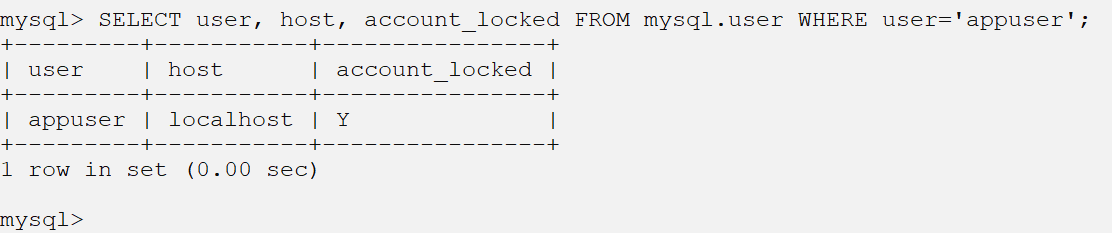
We can verify whether the account is locked using
| SELECT user, host, account_locked FROM mysql.user WHERE user=’appuser’; |
If the account is locked, the account_locked column will show “Y”.
Important Notes:
- Locking a user does not delete the account.
- Existing active sessions will continue until disconnected.
- This method is safer than deleting the user during investigations.
Conclusion:
Locking a MySQL user via CLI is a secure and efficient way to immediately restrict database access without permanently removing the account. It is particularly useful during security incidents, maintenance windows, or access reviews.
