
Post Date: February 27, 2019
Last Updated: October 09, 2026
Introduction
Configuring the maximum password attempts in CentOS 7 is an important step toward improving Linux server security. The Pluggable Authentication Modules (PAM) framework provides options for managing password policies and password-entry retries. In this tutorial, you will learn how to configure the password retry limit in CentOS 7 by reviewing the pam_pwquality.so setting in the /etc/pam.d/system-auth file.
Prerequisites
Before proceeding, ensure that you have the following:
- A server running CentOS 7.
- Root access or a user account with sudo privileges.
- Basic knowledge of Linux commands and text editors such as Nano or Vim.
- Access to the
/etc/pam.d/system-authconfiguration file. - A backup of the existing PAM configuration files before making any changes.
Steps to Set Maximum Password Attempts in CentOS 7
Step 1 :
In the /etc/pam.d directory, You will find the system-auth file .
# cd /etc/pam.d# ls -la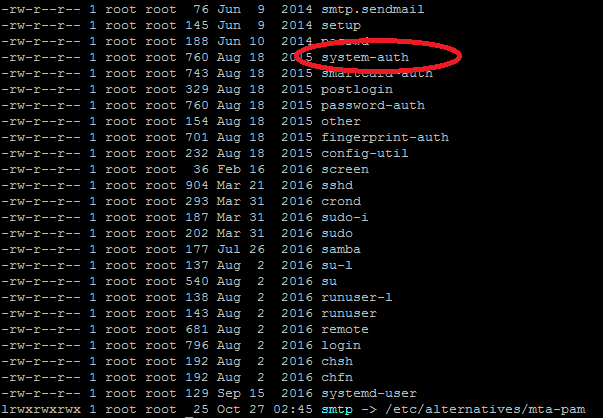
Step 2:
Open system-auth file using nano editor. On opening with nano editor, you can see the complete file as shown below. Edit statement pam_pwquality.so. You can change retry=3 or make it even lower.
In CentOS, this can be easily set by editing the pam_pwquality.so statement present in /etc/pam.d/system-auth
# nano /etc/pam.d/system-auth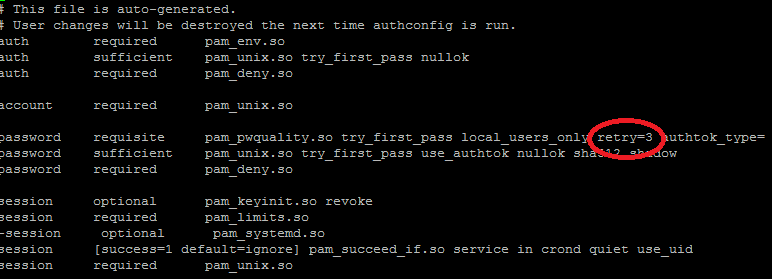
Step 3:
Save the file.
Thus, we have successfully finished configuring the max password login attempts per session for your CentOS 7 server. If you need any assistance Please reach out to here. Link
Conclusion
Configuring the maximum password attempts in CentOS 7 helps administrators manage password-entry retries and strengthen password policies. By reviewing the pam_pwquality.so setting in the PAM configuration file, you can adjust the number of retries allowed when setting or changing a password. Always back up the configuration files before making changes and verify the settings carefully to avoid authentication issues.
Note: The pam_pwquality.so module does not directly limit failed SSH login attempts. For SSH brute-force protection, use an appropriate authentication lockout mechanism or a tool such as Fail2ban. For more information about Linux authentication modules and password policies, refer to the official Documentation The Linux-PAM System Administrators’ Guide
FAQs
1. How do I set the maximum password attempts in CentOS 7?
You can configure password-entry retries in CentOS 7 by reviewing the PAM configuration in /etc/pam.d/system-auth. The retry parameter in pam_pwquality.so controls the number of attempts allowed when entering a new password.
2. What does retry=3 mean in CentOS 7?
The retry=3 parameter allows up to three password-entry attempts when setting or changing a password through the relevant PAM module. It does not directly limit failed SSH login attempts.
3. What is PAM in CentOS 7?
PAM (Pluggable Authentication Modules) is a framework that allows Linux administrators to configure authentication and password policies for system services.
Related Articles
How to install MySQL 8.0 on CentOS 7
How to Install OpenVZ 7 on CentOS 7
Need Help with Linux Server Security?
Need help with Linux server security, password policies, PAM configuration, or SSH login protection? Our experts can help with Linux server administration, security hardening, server monitoring, DevOps and cloud solutions, and other infrastructure requirements. Get in touch with our team here.