
Board Members Module Design and Implementation
The objective of this module is to design and implement a dedicated Board Members page for the website. The page will clearly present each board member’s biography in an individual, well-structured, and readable format using WordPress.
Requirements
Functional Requirements
Create a separate Board Members page.
Rearrange the existing theme templates to support a dedicated board structure.
Display each board member’s biography individually with clear separation.
Ensure all board member details are editable via WordPress.
Maintain consistency with the existing website design and branding.
Non-Functional Requirements
The page should be responsive across desktop, tablet, and mobile devices.
Content loading should be fast and optimized.
The design must be user-friendly and accessible.
Pre-Requisites
Purchase and activation of Elementor Pro to enable advanced customization, flexible layouts, and enhanced design control beyond the limitations of the free version.
Solutions
Elementor Pro was used to:
Create a custom Board Members page layout.
Design reusable sections for individual board member biographies.
Override theme limitations without modifying core theme files.
WordPress page editor and Elementor widgets were leveraged to allow non-technical users to update board member information easily.
Low-Level Design (LLD)
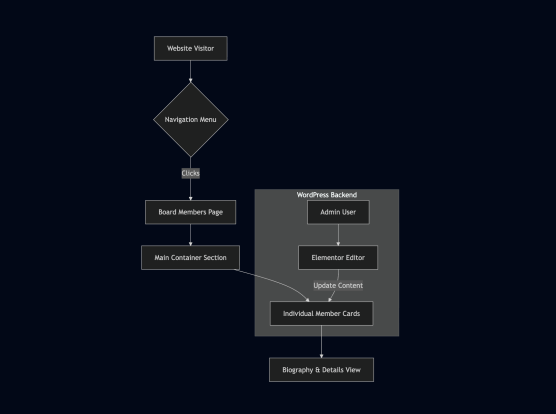
High-Level Design (HLD)
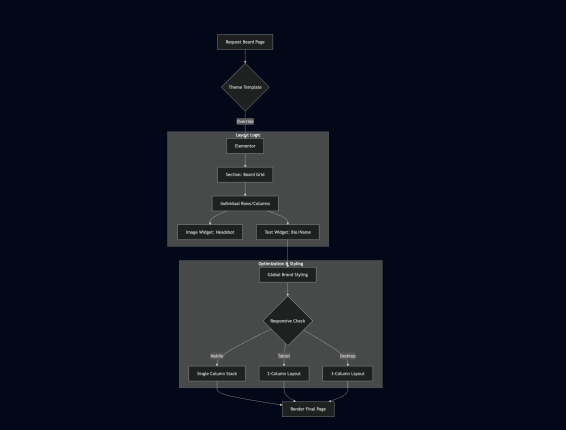
Board Members Page
Created as a standalone WordPress page.
Layout Structure
Section container for board members.
Individual cards/sections for each board member.
Content Elements
Name and bios and Biography text
Tech Stack
CMS Platform
WordPress
Theme & Customization
Purchased WordPress Theme (Customized)
Challenges
The purchased theme has predefined layouts, limiting deep customization.
Creating a fully custom board layout is difficult using the free version of Elementor.
Advanced layout control and flexibility required Elementor Pro, which involves additional cost.
Ensuring the new page blends seamlessly with the existing theme design.
FAQ
1. Why was a separate Board Members page created?
To improve clarity, organization, and professionalism by presenting board member information in a dedicated and structured manner.
2. Why is Elementor Pro required?
Elementor Pro provides advanced layout controls, custom sections, and design flexibility that are not available in the free version.
3. Can board member details be updated easily?
Yes. All content can be edited directly through the WordPress admin panel using Elementor, without coding knowledge.
4. Does this affect the existing website design?
No. The Board Members page follows the existing theme style and branding for consistency.
Conclusion
In conclusion, the Board Members module enhances the website by providing a clear, organized, and responsive way to present board member information.
