
How TO – Section Counter using bootstrap 4
Date posted : 27/01/2019
In this blog post, learn how to create a “section counter” with CSS and BS4.
What is Section Counter?
A section counter is used to tell people how well their business is going, by displaying interesting numbers and its name differs according to its applicable scenes. If it is a college, it is known as ‘project counter‘ etc.
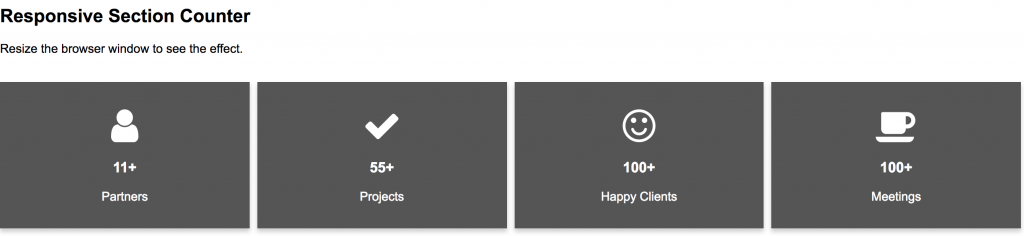
Thus, below attached snapshot will clear you in understand the counters.
Source code for Html, Css, Jquery with Bootstrap 4
Here, we are going to use a bootstrap 4 and style sheet for icons,Follow up or copy the below code and place it in a head tag.
<link href="//maxcdn.bootstrapcdn.com/bootstrap/4.1.1/css/bootstrap.min.css" rel="stylesheet" id="bootstrap-css">
//maxcdn.bootstrapcdn.com/bootstrap/4.1.1/js/bootstrap.min.js
//cdnjs.cloudflare.com/ajax/libs/jquery/3.2.1/jquery.min.js
<!------ Include the above in your HEAD tag ---------->
<!DOCTYPE html>
<html lang="en" >
<head>
<meta charset="UTF-8">
<title>Project counter</title>
<meta name="viewport" content="width=device-width, initial-scale=1.0">
<link rel='stylesheet' href='https://fonts.googleapis.com/css?family=Open+Sans:400,700&'>
<link rel='stylesheet' href='https://cdnjs.cloudflare.com/ajax/libs/font-awesome/4.4.0/css/font-awesome.min.css'>
<link rel="stylesheet" href="css/style.css">
</head>
Projects statistics
12
Projects done
55
Happy professors
359
Techie Students
100
Alumini survey
</div>
</div>
</div>
http://cdnjs.cloudflare.com/ajax/libs/jquery/2.1.3/jquery.min.js
Adding attractive CSS property to it.
@import url(https://fonts.googleapis.com/css?family=PT+Sans+Narrow);
body {
font-family: Open Sans, "Helvetica Neue", "Helvetica", Helvetica, Arial, sans-serif;
font-size: 13px;
color: #666;
position: relative;
-webkit-font-smoothing: antialiased;
margin: 0;
}
* {
-webkit-box-sizing: border-box;
-moz-box-sizing: border-box;
box-sizing: border-box;
}
body, div, dl, dt, dd, ul, ol, li, h1, h2, h3, h4, h5, h6, pre, form, p, blockquote, th, td {
margin: 0;
padding: 0;
font-size: 13px;
direction: ltr;
}
.sectionClass {
padding: 20px 0px 50px 0px;
position: relative;
display: block;
}
.fullWidth {
width: 100% !important;
display: table;
float: none;
padding: 0;
min-height: 1px;
height: 100%;
position: relative;
}
.sectiontitle {
background-position: center;
margin: 30px 0 0px;
text-align: center;
min-height: 20px;
}
.sectiontitle h2 {
font-size: 30px;
color: #222;
margin-bottom: 0px;
padding-right: 10px;
padding-left: 10px;
}
.headerLine {
width: 160px;
height: 2px;
display: inline-block;
background: #101F2E;
}
.projectFactsWrap{
display: flex;
margin-top: 30px;
flex-direction: row;
flex-wrap: wrap;
}
#projectFacts .fullWidth{
padding: 0;
}
.projectFactsWrap .item{
width: 25%;
height: 100%;
padding: 50px 0px;
text-align: center;
}
.projectFactsWrap .item:nth-child(1){
background: rgb(16, 31, 46);
}
.projectFactsWrap .item:nth-child(2){
background: rgb(18, 34, 51);
}
.projectFactsWrap .item:nth-child(3){
background: rgb(21, 38, 56);
}
.projectFactsWrap .item:nth-child(4){
background: rgb(23, 44, 66);
}
.projectFactsWrap .item p.number{
font-size: 40px;
padding: 0;
font-weight: bold;
}
.projectFactsWrap .item p{
color: rgba(255, 255, 255, 0.8);
font-size: 18px;
margin: 0;
padding: 10px;
font-family: 'Open Sans';
}
.projectFactsWrap .item span{
width: 60px;
background: rgba(255, 255, 255, 0.8);
height: 2px;
display: block;
margin: 0 auto;
}
.projectFactsWrap .item i{
vertical-align: middle;
font-size: 50px;
color: rgba(255, 255, 255, 0.8);
}
.projectFactsWrap .item:hover i, .projectFactsWrap .item:hover p{
color: white;
}
.projectFactsWrap .item:hover span{
background: white;
}
@media (max-width: 786px){
.projectFactsWrap .item {
flex: 0 0 50%;
}
}
Adding Jquery for counter
$.fn.jQuerySimpleCounter = function( options ) {
var settings = $.extend({
start: 0,
end: 100,
easing: 'swing',
duration: 400,
complete: ''
}, options );
var thisElement = $(this);
$({count: settings.start}).animate({count: settings.end}, {
duration: settings.duration,
easing: settings.easing,
step: function() {
var mathCount = Math.ceil(this.count);
thisElement.text(mathCount);
},
complete: settings.complete
});
};
$('#number1').jQuerySimpleCounter({end: 12,duration: 3000});
$('#number2').jQuerySimpleCounter({end: 55,duration: 3000});
$('#number3').jQuerySimpleCounter({end: 359,duration: 2000});
$('#number4').jQuerySimpleCounter({end: 246,duration: 2500});
/* AUTHOR LINK */
$('.about-me-img').hover(function(){
$('.authorWindowWrapper').stop().fadeIn('fast').find('p').addClass('trans');
}, function(){
$('.authorWindowWrapper').stop().fadeOut('fast').find('p').removeClass('trans');
});
By arranging all the above source code, you will get a end output in good manner and add your own icons for it.
End output:

Thanks for using pheonix solutions.