JQuery hide() and show()

Jquery hide() and show()

Date posted: 30/05/2019

JQUERY:

jQuery is a JavaScript Library. It is a easiest way to use JavaScript on your website.

jQuery Event

You can write code that runs when a user clicks on a certain part or when moves mouse over a form element.

For example, this code listens when click the button.

<!DOCTYPE html>
<html>
<head>
<meta name="viewport" content="width=device-width, initial-scale=1">
<link rel="stylesheet" href="https://maxcdn.bootstrapcdn.com/bootstrap/3.4.0/css/bootstrap.min.css">
https://ajax.googleapis.com/ajax/libs/jquery/3.4.0/jquery.min.js
https://maxcdn.bootstrapcdn.com/bootstrap/3.4.0/js/bootstrap.min.js
<link href="https://gitcdn.github.io/bootstrap-toggle/2.2.2/css/bootstrap-toggle.min.css" rel="stylesheet">
https://gitcdn.github.io/bootstrap-toggle/2.2.2/js/bootstrap-toggle.min.js

</head>

$(function () {
      $("#chkPassport").change(function () {
          if ($(this).is(":checked")) {
              $("#dvPassport").show();
          } else {
              $("#dvPassport").hide();
          }
      });
  });


<body>
<h5><b> jquery hide() and show() </b></h5>
click hear to enter id
Enter id:
</div> </body> </html>

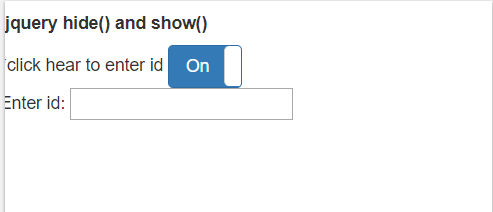
Text box will show when when switch is on:

Thanks for using pheonix solutions.

You find this tutorial helpful? Share with your friends to keep it alive.

admin

Our team has expertise across software and web development, WordPress, e-commerce, mobile applications, UI/UX, cloud and infrastructure, DevOps, CI/CD, API integration, security, testing, automation, and technical support. The team also works with AI-based software solutions, LLMs, AI workflows, AI agents, and intelligent application development to help businesses automate processes and build smarter digital solutions. We focus on developing, deploying, maintaining, and optimising secure, scalable, and reliable technology solutions while helping businesses adopt modern technologies and drive digital transformation.


Leave a Reply

Scroll to Top