
PHP Script for CRUD Application
Date :06/12/2018
What is CRUD?
CRUD refers to the four basic types of Database operations: Create, Read, Update, Delete. Most applications and projects perform CRUD functionality.
This is a important script for all PHP beginners. Once you learn about these CRUD operations, you can use them for many projects.
Executing a CRUD Script
Step by step procedure are as follows;
STEP 1:
- In this script, I have taken a example as testimonial section for CRUD usage.
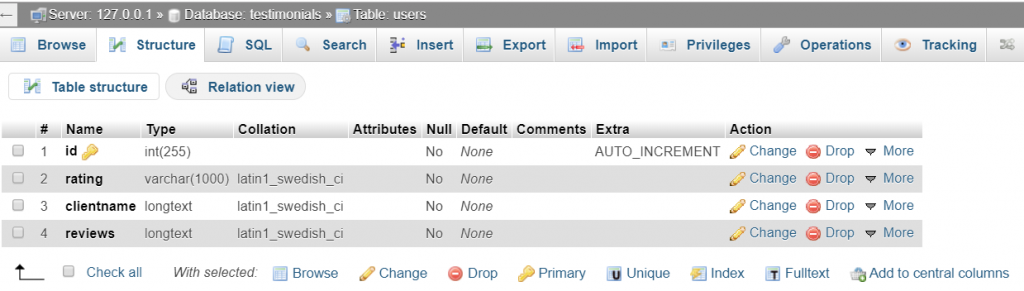
- In a PHPMYADMIN , create a database Name “testimonials“
- Create a table name as “users“
- Create a table structure of rows having id , rating, clientname, reviews. I have attached a snapshot below,
STEP 2:
Create a connection.php file in your favorite text editor and execute the below script to make connection with your DB.
<?php

$databaseHost = 'localhost';
$databaseName = 'testimonials';
$databaseUsername = 'root';
$databasePassword = '';

$mysqli = mysqli_connect($databaseHost, $databaseUsername, $databasePassword, $databaseName);

?>
Step 3:
Create add.php file and execute the below script for adding the Information and to insert a queries in to DB.
The programming script is with Enhanced CSS quality. Take a look on it and make use of it,
<html>
<style>
input[type=text] {
    color: #777;
    padding-left: 10px;
    margin: 10px;
    margin-top: 12px;
    margin-left: 18px;
    width: 290px;
    height: 35px;
    border: 1px solid #c7d0d2;
    border-radius: 2px;
    box-shadow: inset 0 1.5px 3px rgba(190, 190, 190, .4), 0 0 0 5px #f5f7f8;
}


   input[type=submit] {
    float: left;
    margin-right: 20px;

    width: 100px;
    height: 30px;
    font-size: 14px;
    font-weight: bold;
    color: #fff;
    background-color: #acd6ef; /*IE fallback*/
    background-image: -webkit-gradient(linear, left top, left bottom, from(#acd6ef), to(#6ec2e8));
    background-image: -moz-linear-gradient(top left 90deg, #acd6ef 0%, #6ec2e8 100%);
    background-image: linear-gradient(top left 90deg, #acd6ef 0%, #6ec2e8 100%);
    border-radius: 30px;
    border: 1px solid #66add6;
    box-shadow: 0 1px 2px rgba(0, 0, 0, .3), inset 0 1px 0 rgba(255, 255, 255, .5);
    cursor: pointer;
   }
</style>
<body>
  <a href="list.php"><input type="submit" value="<< Added " name="Go Back" /></a>
  <br/><br/>

  <form action="add.php" method="post" name="form1">
    <table width="25%" border="0">
      <tr>
        <td><span style="color:blue">rating</span></td>
        <td><input type="text" name="rating"></td>
      </tr>
      <tr>
        <td><span style="color:blue">clientname</span></td>
        <td><input type="text" name="clientname"></td>
      </tr>
      <tr>
          <td><span style="color:blue">reviews</span></td>
        <td><input type="text" name="reviews"></td>
      </tr>
      <tr>

        <td><input type="submit" name="Submit" value="Add >>"></td>
      </tr>

    </table>
  </form>

  <?php

  // Check If form submitted, insert form data into users table.
   if(isset($_POST['Submit'])) {
    $rating = $_POST['rating'];
    $clientname = $_POST['clientname'];
    $reviews = $_POST['reviews'];

    // include database connection file
    include_once("connection.php");

    // Insert user data into table
    $result = mysqli_query($mysqli, "INSERT INTO users(rating,clientname,reviews) VALUES('$rating','$clientname','$reviews')");


  }

     ?>

</body>
</html>
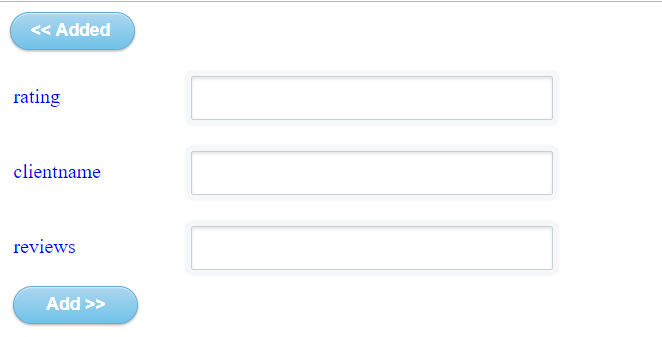
Once You execute this in XAMPP , the output will be like this.
STEP 4:
Create edit.php file and execute the below script .Once you edited, You will see changes in DB and you can modify the added contents.
<?php
// include database connection file
include_once("connection.php");

// Check if form is submitted for user update, then redirect to homepage after update
if(isset($_POST['update']))
{

	$id = $_POST['id'];

	$rating=$_POST['rating'];
	$clientname=$_POST['clientname'];
	$reviews=$_POST['reviews'];

	// update user data
	$result = mysqli_query($mysqli, "UPDATE users SET rating='$rating',clientname='$clientname',reviews='$reviews' WHERE id=$id");

	// Redirect to homepage to display updated user in list
	header("Location: list.php");
}
?>
<?php
// Display selected user data based on id
// Getting id from url
$id = $_GET['id'];

// Fetech user data based on id
$result = mysqli_query($mysqli, "SELECT * FROM users WHERE id=$id");

while($user_data = mysqli_fetch_array($result))
{
	$rating = $user_data['rating'];
	$clientname = $user_data['clientname'];
	$reviews = $user_data['reviews'];

}
?>
<html>
<head>
	<title>Edit User Data</title>
</head>
 <style>
    input[type=text] {
    color: #777;
    padding-left: 10px;
    margin: 10px;
    margin-top: 12px;
    margin-left: 18px;
    width: 290px;
    height: 35px;
    border: 1px solid #c7d0d2;
    border-radius: 2px;
    box-shadow: inset 0 1.5px 3px rgba(190, 190, 190, .4), 0 0 0 5px #f5f7f8;
}
  input[type=submit] {
    float: left;
    margin-right: 20px;
    width: 180px;
    height: 30px;
    font-size: 14px;
    font-weight: bold;
    color: #fff;
    background-color: #acd6ef; /*IE fallback*/
    background-image: -webkit-gradient(linear, left top, left bottom, from(#acd6ef), to(#6ec2e8));
    background-image: -moz-linear-gradient(top left 90deg, #acd6ef 0%, #6ec2e8 100%);
    background-image: linear-gradient(top left 90deg, #acd6ef 0%, #6ec2e8 100%);
    border-radius: 30px;
    border: 1px solid #66add6;
    box-shadow: 0 1px 2px rgba(0, 0, 0, .3), inset 0 1px 0 rgba(255, 255, 255, .5);
    cursor: pointer;
   }
   </style>
   <body>

	<a href="list.php"><input type="submit" name="Submit" value="Home Listings"></a>
	<br/><br/>

	<form name="update_user" method="post" action="edit.php">
		<table border="0">
			<tr>
				<td><span style="color:blue">rating</span></td>
				<td><input type="text" name="rating" value=<?php echo $rating;?>></td>
			</tr>
			<tr>
				<td><span style="color:blue">clientname</span></td>
				<td><input type="text" name="clientname" value=<?php echo $clientname;?>></td>
			</tr>
			<tr>
				<td><span style="color:blue">reviews</span></td>
				<td><input type="text" name="reviews" value=<?php echo $reviews;?>></td>
			</tr>
			<tr>
				<td><input type="hidden" name="id" value=<?php echo $_GET['id'];?>></td>
				<td><input type="submit" name="update" value="Update"></td>
			</tr>
		</table>
	</form>
</body>
</html>
STEP 5:
Create a file called delete.php , This will delete the content and directly delete in DB.
<?php
// include database connection file

include_once("connection.php");

// Get id from URL to delete that user
$id = $_GET['id'];

// Delete user row from table based on given id
$result = mysqli_query($mysqli, "DELETE FROM users WHERE id=$id");

// After delete redirect to Home, so that latest user list will be displayed.
header("Location:list.php");
?>
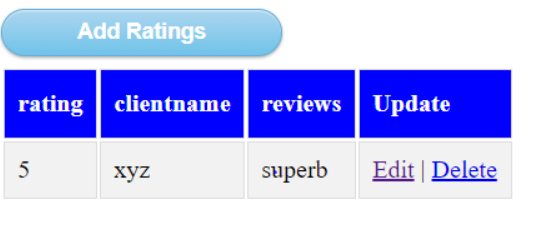
The output will look like this,
You can Edit / Delete a content Both in UI and DB
Step 6:
I named a file as “list.php” , this is index page for a total crud.
<?php
// Create database connection using config file
include_once("connection.php");

// Fetch all users data from database
$result = mysqli_query($mysqli, "SELECT * FROM users ORDER BY id DESC");
?>

<html>
<head>
    <title>Homepage</title>
</head>
<style>
<style>
#rating {
    font-family: "Trebuchet MS", Arial, Helvetica, sans-serif;
    border-collapse: collapse;
    width: 100%;
}

#rating td, #rating th {
    border: 1px solid #ddd;
    padding: 8px;
}

#rating tr:nth-child(even){background-color: #f2f2f2;}

#rating tr:hover {background-color: #ddd;}

#rating th {
    padding-top: 12px;
    padding-bottom: 12px;
    text-align: left;
    background-color: blue;
    color: white;
}

input[type=submit] {
    float: left;
    margin-right: 20px;
    width: 180px;
    height: 30px;
    font-size: 14px;
    font-weight: bold;
    color: #fff;
    background-color: #acd6ef; /*IE fallback*/
    background-image: -webkit-gradient(linear, left top, left bottom, from(#acd6ef), to(#6ec2e8));
    background-image: -moz-linear-gradient(top left 90deg, #acd6ef 0%, #6ec2e8 100%);
    background-image: linear-gradient(top left 90deg, #acd6ef 0%, #6ec2e8 100%);
    border-radius: 30px;
    border: 1px solid #66add6;
    box-shadow: 0 1px 2px rgba(0, 0, 0, .3), inset 0 1px 0 rgba(255, 255, 255, .5);
    cursor: pointer;
   }
</style>
</style>

<body>
<a href="add.php"><input type="submit" name="Submit" value="Add Ratings"></a><br/><br/>


	<table id = "rating">

    <tr>
        <th>rating</th> <th>clientname</th> <th>reviews</th> <th>Update</th>
    </tr>
    <?php
    while($user_data = mysqli_fetch_array($result)) {
        echo "<tr>";
        echo "<td>".$user_data['rating']."</td>";
        echo "<td>".$user_data['clientname']."</td>";
        echo "<td>".$user_data['reviews']."</td>";
        echo "<td><a href='edit.php?id=$user_data[id]'>Edit</a> | <a href='delete.php?id=$user_data[id]'>Delete</a></td></tr>";
    }
    ?>
    </table>
</body>
</html>
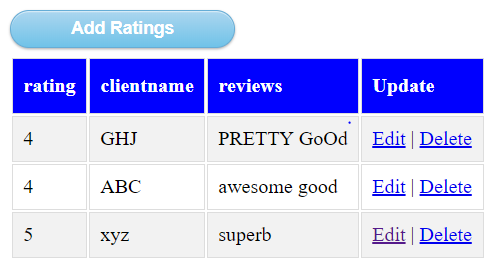
In the above example, the effective usage of crud is explained clearly, you can modify the script according to your application and make benefit of it.