
PHPMYADMIN -BLOWFISH_SECRET AND TEMPDIR IS NOT ACCESSIBLE ERRORS
DATE POSTED: 11/04/2019
Introduction
Moreover, In this article, helps you in eradicating the error {BLOWFISH_SECRET AND TEMPDIR } after every installation of phpmyadmin.
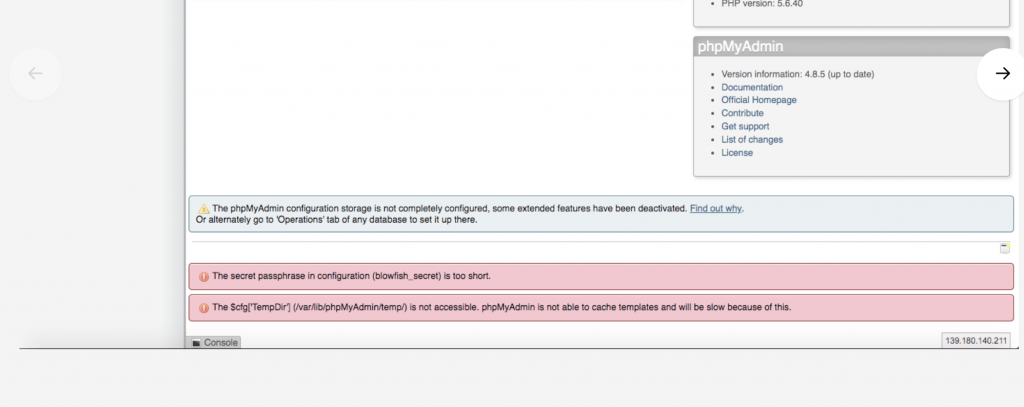
Step by step guidelines to eradicate the issue:
BLOWFISH_SECRET ERROR:
After login into phpMyAdmin panel you get this error message[1]
“Blowfish Secret Password Too Short Fix”
Everything work fine I can manage everything, but if security is important for you, you should look at the solution.
To resolve this issue, just open config.inc.php ( or rename config.sample.inc.php to config.inc.php if you haven’t done so yet ) and change this line
# nano /etc/phpMyAdmin/config.inc.php$cfg['blowfish_secret'] = 'xyzxyz'; /* YOU MUST FILL IN THIS FOR COOKIE AUTH! */$cfg[‘blowfish_secret’] = ‘P5DS+radU0TOqI7HX$cH!eb3zwnDDoDr’; /* YOU MUST FILL IN THIS FOR COOKIE AUTH! */Therefore, save the config file. For instance, have a look at phpmyadmin, now the error is resolved.
TEMPDIR ERROR:
In addition to that, After login into phpMyAdmin panel you get this error message[2]
“The $cfg‘TempDir’ is not accessible”
Similarly, to eradicate an issue, open the config.inc.php file and add the $cfg[‘TempDir’] = ‘/tmp’; inside the Directories for saving/loading files from server .
#nano /etc/phpMyAdmin/config.inc.php* Directories for saving/loading files from server
*/
$cfg[‘UploadDir’] = ‘’;
$cfg[‘SaveDir’] = ‘’;
$cfg[‘TempDir’] = ‘/tmp’;
/**In conclusion, save the config file. As a result, have a look at phpmyadmin, now the error is resolved.
That’s it.
Thanks for using pheonix solutions.
You find this tutorial helpful? Share with your friends to keep it alive.