
Introduction
Managing DNS zones through VestaCP is usually straightforward, but sometimes Bind9 may fail to load zone files even when file permissions appear to be configured correctly. One of the most common errors administrators encounter is:
zone example.com/IN: loading from master file /home/admin/conf/dns/example.com.db failed: permission denied
At first glance, this looks like a standard Linux file permission issue. However, in many cases, the actual cause is AppArmor security restrictions preventing Bind from accessing DNS zone files stored in VestaCP’s custom directory structure.
In this guide, you’ll learn how to identify the root cause, verify file permissions, check AppArmor restrictions, and permanently resolve the Bind9 “permission denied” error on Ubuntu servers running VestaCP.
Error Overview
When restarting or reloading Bind9, you may see an error similar to:
zone example.com/IN: loading from master file /home/admin/conf/dns/example.com.db failed: permission denied
This prevents Bind from loading the DNS zone, causing DNS records for the affected domain to stop resolving correctly.
Root Cause
The issue is typically caused by one of the following:
- Incorrect file ownership on the DNS zone file.
- Insufficient read permissions for the Bind service.
- AppArmor preventing Bind from accessing files outside its default directories.
- Corrupted or inaccessible zone files.
- Incorrect Bind configuration.
In VestaCP environments, the most common cause is AppArmor blocking access to zone files stored under:
/home/admin/conf/dns/
Because Bind’s default AppArmor profile only allows access to specific directories such as:
/etc/bind/
the service cannot read VestaCP-managed DNS zone files unless the profile is updated.
Troubleshooting Flow
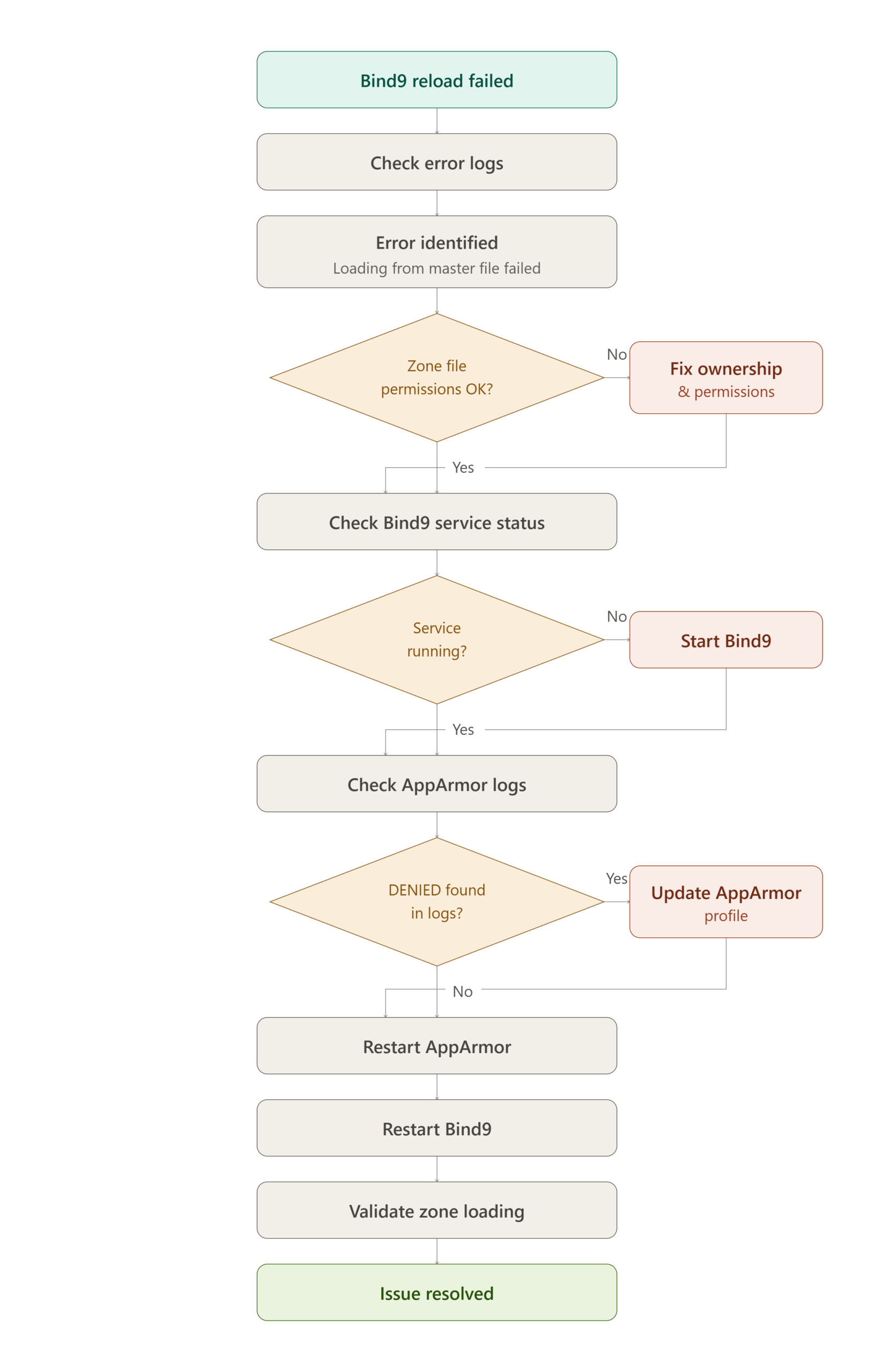
Solution
Step 1: Verify File Permissions
ls -lah /home/admin/conf/dns/
Expected output:
-rw-r----- 1 root bind 645 Nov 28 13:09 example.com.db
Correct if necessary:
chown root:bind /home/admin/conf/dns/example.com.db
chmod 640 /home/admin/conf/dns/example.com.db
Step 2: Confirm Bind Is Running
ps aux | grep named
Expected output:
bind 16679 0.0 0.3 238688 13692 ? Ssl 13:18 0:00 /usr/sbin/named -u bind
Step 3: Check AppArmor Denials
journalctl -xe | grep apparmor
or
dmesg | grep DENIED
Example:
apparmor="DENIED" operation="open"
profile="/usr/sbin/named"
name="/home/admin/conf/dns/example.com.db"
Step 4: Update AppArmor Profile
Edit:
nano /etc/apparmor.d/usr.sbin.named
Find:
/etc/bind/** rw,
Add:
/home/** rwm,
Save and exit.
Step 5: Restart Services
systemctl restart apparmor
systemctl restart bind9
Step 6: Validate Configuration
named-checkconf
Validate the zone:
named-checkzone example.com /home/admin/conf/dns/example.com.db
Reload DNS:
rndc reload
Conclusion
The Bind9 “loading from master file failed: permission denied” error in VestaCP environments is often misleading because file permissions may appear perfectly valid. In most cases, AppArmor is blocking access to DNS zone files stored under VestaCP’s custom DNS directory.
By verifying file ownership, checking AppArmor logs, updating the Bind AppArmor profile, and restarting the required services, you can quickly restore DNS functionality and prevent future zone loading failures.
Following the troubleshooting steps outlined in this guide will help ensure your Bind9 server can successfully access and load all VestaCP-managed DNS zones.
Frequently Asked Questions (FAQ)
1. Why does Bind show “permission denied” even when the file permissions are correct?
This usually happens because AppArmor is restricting Bind’s access to the zone file. Linux file permissions may be correct, but AppArmor can still block access based on its security policy.
2. How can I verify whether AppArmor is causing the issue?
Run:
journalctl -xe | grep apparmor
or
dmesg | grep DENIED
If you see AppArmor DENIED messages referencing the zone file, AppArmor is the cause.
3. Is it safe to allow Bind access to /home/admin/conf/dns/?
Yes. VestaCP stores DNS zone files in this location. Updating the AppArmor profile to allow Bind access to the required directory is a standard and safe solution when properly configured.
Related Articles
- Add Webmail Alias in VestaCP Panel on Ubuntu 16.04
- Laravel Installation on a VestaCP Account
- How to Force Webmail to Use SSL in VestaCP
Talk to our experts
Looking for the right technology solution for your business? Our team of experts can help you with development, cloud, DevOps, design, and a wide range of other technology needs. Get in touch with our team here.