
Objective
The objective of this module is to design and implement an interactive 3D Avatar Companion viewer within a mobile application. The engine provides users with a fluid interface to discover, download, cache, and interact with live-rendered 3D models (.glb files) while executing structural animations directly on the client view.
Requirements
Functional Requirements
- Dynamic Model Discovery: Automatic listing of remote asset folders without hardcoding identifiers.
- On-Demand Dynamic Download: Direct downloading of heavy 3D assets (~35MB) with accurate, real-time progress percentages.
- Cache-First Loading Architecture: local lookup engine that bypasses network requests if an asset is already verified on disk.
- Live 3D Viewport: Interactive 3D canvas supporting multi-touch rotation and zoom configurations.
- Animation Mapping & Discovery: Dynamic extraction and formatting of embedded animation clips directly out of the rendered model.
Non-Functional Requirements
- Memory Management: Separation of metadata tracking from large binary file paths on disk.
- UI/UX Polishing: Shared Element transitions (
Herotags) and strict alignment grids to avoid component sizing layout shifts during scrolling. - Offline Resiliency: Complete asset viewing functionality during network dropouts once cached.
Pre-Requisites
- Stateful Architecture: Flutter framework utilizing robust
StatefulWidgetlifecycle hooks. - NoSQL Key-Value Store: Hive configured for fast key-value local metadata tracking.
- Backend Storage Infrastructure: Firebase Cloud Storage buckets configured for dynamic asset storage.
- 3D Native Plugin Layer:
flutter_3d_controllerintegrated into the native layer.
Solutions
The implementation builds a seamless, high-performance runtime loop:
- Decoupled Architecture Concerns: Distributed logic across
AvatarStorageService(remote fetch network tier) andAvatarCacheService(local disk caching manifest layer). - Sanitized String Formatters: Client-side parsing that dynamically maps raw, underscores-heavy animation clip names into readable Title Case labels while passing the expected raw names back to the engine.
- Stale Record Invalidation: Automatic verification checks that validate manifest references against physical on-disk file availability to heal corrupted app-data states.
High-Level Design (HLD)
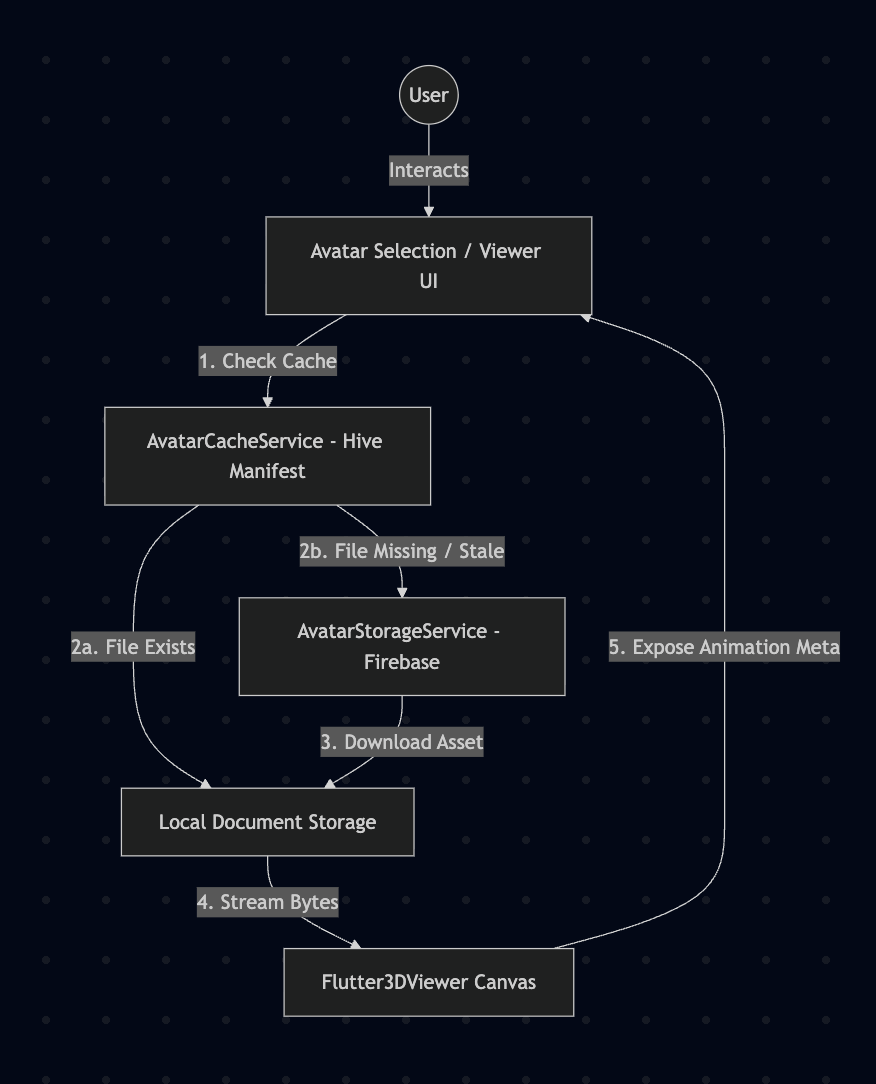
Low-Level Design (LLD)
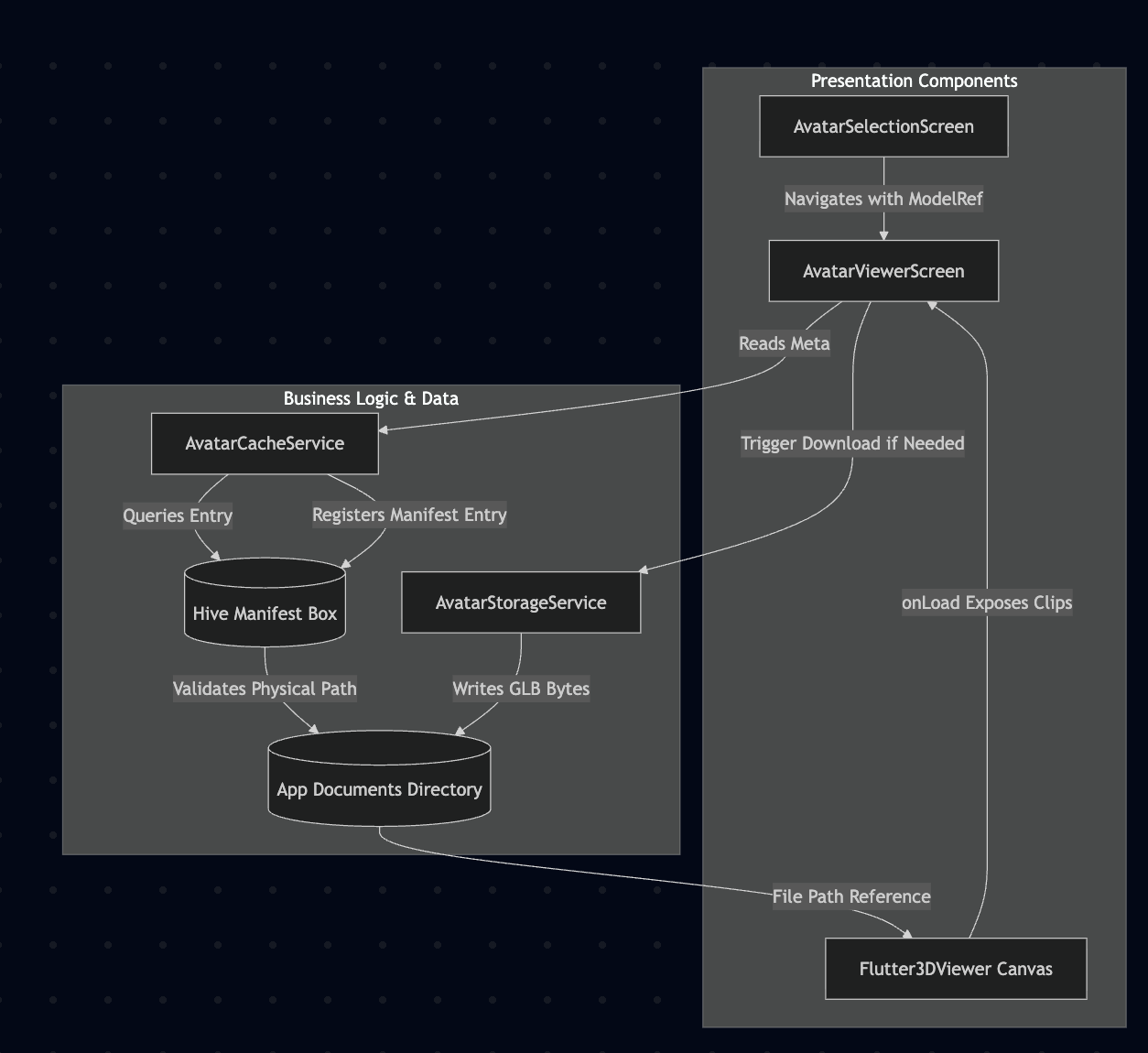
Tech Stack
- Framework: Flutter (Dart)
- 3D Renderer:
flutter_3d_controller(.glbparser) - Cloud Infrastructure: Firebase Storage
- Local Caching Manifest: Hive Database
- Device Storage Utility:
path_provider
Challenges
- Manifest Desynchronization: An entry might exist in the database, but OS storage utilities or user interventions could clear physical app data files. This was handled by checking explicit
.exists()metrics before accepting cache truth. - Visual Grid Inconsistencies: Custom horizontally scrollable buttons with varying text lengths caused layout visual imbalances. This was solved by utilizing a custom
ConstrainedBoxwrapper forcing standardized minimum sizing blocks. - SDK Version Drift: Component APIs across native 3D viewport plugins frequently alter call sign signatures. This required isolating animation querying explicitly to post-rendered runtime execution checks.
FAQ
1. Are the large 3D models stored inside the database?
No. The ~35MB binary files are saved strictly as flat files in the local filesystem storage path. The database only tracks structural metadata maps pointing to where those items live.
2. How does the application format underscore-heavy clip identifiers safely?
We separate presentation names from engine values using a split utility string formatter. It changes names into Title Case for user interaction buttons while feeding the exact original raw ID back down to the 3D rendering pipeline.
3. What happens if an item source changes inside Firebase Storage?
The cache strategy uses a cache-first approach. If an object definition updates on the cloud repository, a clear function must be invoked to wipe the local manifest and reload the updated binary model.
4. Can users switch animations smoothly mid-render?
Yes. Because animations are natively evaluated directly inside the loaded 3D asset scene viewport, firing controller actions triggers immediate runtime shifts without requiring a clean view redraw.