
HOW TO SECURE A SERVER USING AUDITD SERVICE
HOW TO SECURE A SERVER USING AUDITD SERVICE
DATE POSTED: 24/02/2019
Introduction on Auditd service
Auditd is a key component which plays major role in Linux Auditing System. It is responsible for writing audit records to disk. You can configure audit rules, view logs and customize it based on your requirements.
Importance of Auditd
Auditd allows you to closely monitor every activity in the server and
helps in providing valuable insights about server performance .

How to enable Auditid service in centos-7
Audit system uses two packages: audit and audit-libs.
Step 1 :
If you want to install audit, you can use the following command
# sudo yum install auditStep 2:
You can check if audit is installed on your server using the command
# sudo yum list audit audit-libsStep 3:
To enable auditd
systemctl enable auditd.serviceStep 4:
After enabled, you can start the service using command
systemctl start auditd.serviceStep 5:
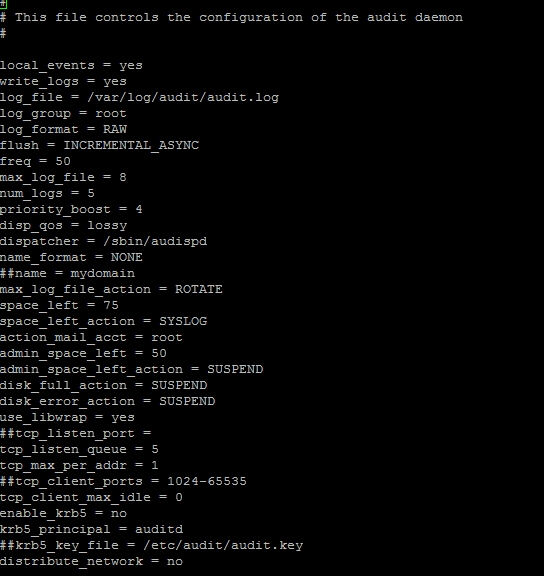
You can configure auditd-related information such as num_logs, max_log_file in the file /etc/audit/auditd.conf.
# nano /etc/audit/auditd.confFor your reference , here is the sample snapshot of auditd.conf-
And that’s it! Your server is now secure by its features.
Thanks for using pheonix solutions.
You find this tutorial helpful? Share with your friends to keep it alive.
