
Nagstamon installation on Windows
Date Posted: 13-06-2017
Nagstamon is a tool which used to monitor nagios server on windows desktop machine. This will be useful to monitor to multiple nagios server.
Prerequisites:
- Windows Desktop
- Nagios Server
Implementation:
Download the nagstamon from the official site.
https://nagstamon.ifw-dresden.de/files/stable/Nagstamon-2.0.1-win64.zip
Unzip the file and go to the directory Nagstamon
Click on the file “nagstamon”
Click on New Server
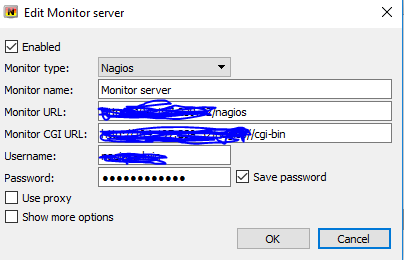
Add the nagios server details. We need to give the following details.
Monitor Name: <Any Name>
Monitor URL: http://IPaddress/nagios
Monitor CGI URL: http://IPaddress/nagios/cgi-bin
Username: <nagios interface username>
Password : <Nagios password>
Click on Ok.
New Icon will be created on your local windows machine.
Go to the Nagstamon Icon, Right click and select Settings.
Under Filters Menu, Select below options.
+ All Down Hosts
+ All Unreachable Hosts
+ All Critical Services
+ Service on Reachable Hosts
Click on OK.
Now, we can see the alerts on critical, unreachable, Critical Services on our desktop. We don’t need to login nagios interface to monitor the critical alerts.