Introduction
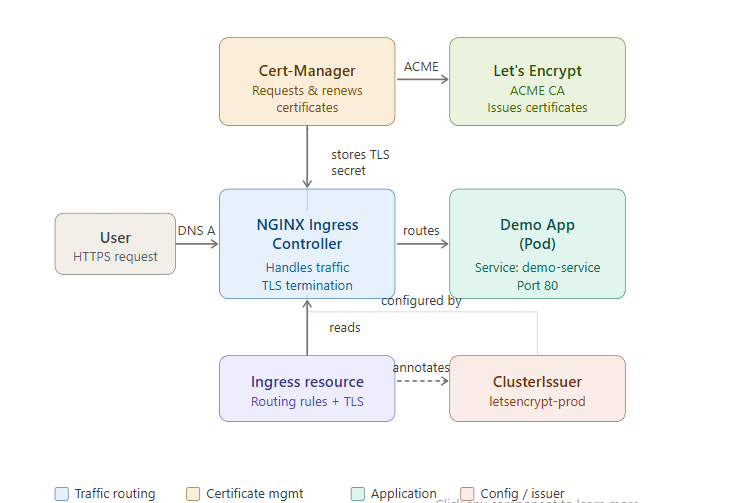
Managing external access to applications in Kubernetes can feel complex—especially when you want secure HTTPS connections. Fortunately, Kubernetes provides a powerful combination of Ingress and automatic SSL certificate management using tools like NGINX Ingress Controller and Cert-Manager.
In this guide, you’ll learn how to:
- Set up an Ingress controller manually (no Helm)
- Configure automatic SSL using Let’s Encrypt
- Secure your application with HTTPS
Architecture Overview
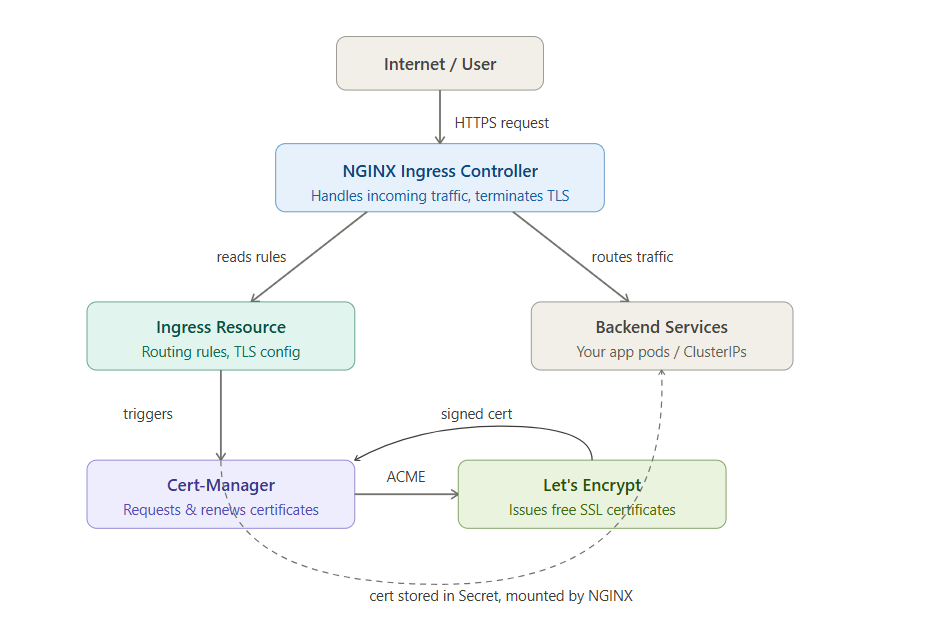
Before we begin, here’s how everything connects:
- Ingress Controller (NGINX) → Handles incoming traffic
- Cert-Manager → Requests & renews SSL certificates
- Let’s Encrypt → Issues free SSL certificates
- Ingress Resource → Defines routing rules
Step 1: Install NGINX Ingress Controller
Apply the official manifest directly:
kubectl apply -f https://raw.githubusercontent.com/kubernetes/ingress-nginx/main/deploy/static/provider/cloud/deploy.yamlVerify installation:
kubectl get pods -n ingress-nginxWait until all pods are in Running state.
Step 2: Install Cert-Manager
Apply Cert-Manager CRDs and components:
kubectl apply -f https://github.com/cert-manager/cert-manager/releases/latest/download/cert-manager.yamlCheck pods:
kubectl get pods -n cert-managerStep 3: Create a ClusterIssuer for Let’s Encrypt
This defines how certificates are issued.
apiVersion: cert-manager.io/v1
kind: ClusterIssuer
metadata:
  name: letsencrypt-demo
spec:
  acme:
    email: your-email@example.com
    server: https://acme-v02.api.letsencrypt.org/directory
    privateKeySecretRef:
      name: letsencrypt-demo-key
    solvers:
    - http01:
        ingress:
          class: nginx
Apply it:
kubectl apply -f cluster-issuer.yamlStep 4: Deploy Your Application
Example deployment and service:
apiVersion: apps/v1
kind: Deployment
metadata:
  name: demo-app
spec:
  replicas: 1
  selector:
    matchLabels:
      app: demo-app
  template:
    metadata:
      labels:
        app: demo-app
    spec:
      containers:
      - name: demo-app
        image: nginx
        ports:
        - containerPort: 80
---
apiVersion: v1
kind: Service
metadata:
  name: demo-service
spec:
  selector:
    app: demo-app
  ports:
    - port: 80
      targetPort: 80
Step 5: Create Ingress with Auto SSL
apiVersion: networking.k8s.io/v1
kind: Ingress
metadata:
  name: demo-ingress
  annotations:
    cert-manager.io/cluster-issuer: "letsencrypt-demo"
spec:
  ingressClassName: nginx
  tls:
  - hosts:
    - yourdomain.com
    secretName: demo-tls
  rules:
  - host: yourdomain.com
    http:
      paths:
      - path: /
        pathType: Prefix
        backend:
          service:
            name: demo-service
            port:
              number: 80
Apply it:
kubectl apply -f ingress.yamlStep 6: Point Your Domain
Update your DNS:
- Add an A record pointing
yourdomain.com→ Ingress external IP
Check IP:
kubectl get svc -n ingress-nginxStep 7: Verify SSL Certificate
Check certificate status:
kubectl describe certificateOnce issued, access:
https://yourdomain.comYou should see a secure HTTPS connection
Conclusion
Setting up Kubernetes Ingress with automatic SSL certificates without Helm gives you full control and a deeper understanding of your cluster. By combining NGINX Ingress Controller and Cert-Manager, you can securely expose applications with minimal manual effort.
Once configured, certificates renew automatically—so you can focus on building your application instead of managing infrastructure.