
Objective
The objective of this module is to design and implement a production-grade Dynamic Calendar and Class Booking system for the United Grooves mobile application. The module provides users with a seamless way to browse, filter, and book sessions using a highly responsive, modern interface built with Jetpack Compose.
Requirements
Functional Requirements
- Dynamic Week Navigation: Implementation of a “Week of” selector with a built-in DatePicker for jumping to specific dates.
- Context-Aware Date Row: A horizontal scrollable date row that displays class counts per day.
- Search & Discovery: Integrated search bar to filter classes by title or instructor name in real-time.
- Advanced Filtering: Dropdown systems for “Activity” and “Instructor” categories.
- Booking Integration: Actionable event cards supporting “Add to Cart” and “Book Now” workflows.
Non-Functional Requirements
- Performance Optimization: Efficient list rendering using
LazyColumnandLazyRowto ensure smooth scrolling. - Architecture: Adherence to Clean Architecture and MVVM (Model-View-ViewModel) patterns.
- Theming & Branding: Strict implementation of the
UnitedGroovesThemefor design consistency. - State Management: Utilization of
StateFlowandcollectAsStateWithLifecyclefor lifecycle-aware UI updates.
Pre-Requisites
- Hilt Dependency Injection: Configured for ViewModel and Repository management.
- Java 8+ / ThreeTenABP: Required for
java.timeAPI support on older Android versions. - Custom Design System: Pre-defined
UnitedGroovesThemeand custom components likeProfileViewHeaderandEventFilterDropdown. - GraphQL/Data Layer: A functional backend or repository layer to provide class data.
Solutions
The Jetpack Compose framework was leveraged to:
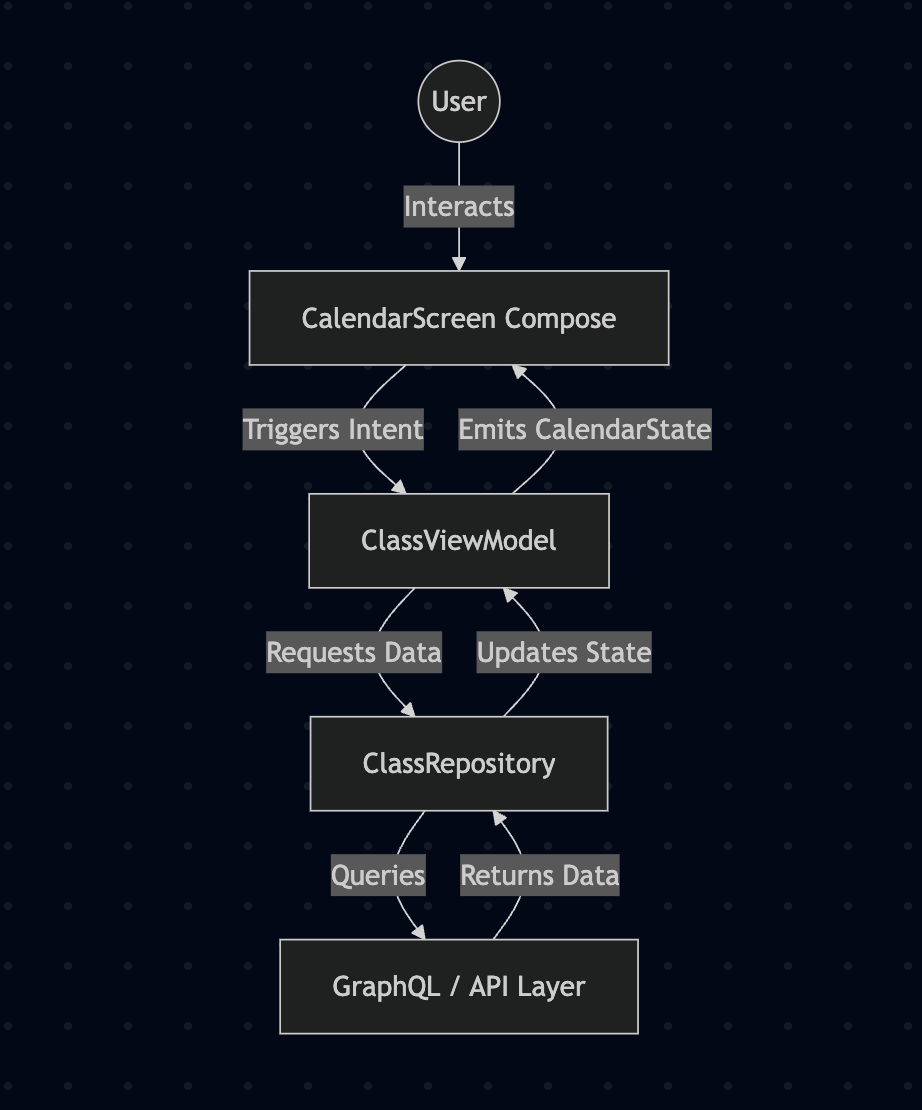
- Create a Stateless UI where the
CalendarScreenreacts to a singleCalendarStateobject. - Design Reusable UI Components (Event Cards, Search Bars) that can be utilized across other app modules.
- Implement Base64 Bitmap Decoding directly within the Composable using
rememberblocks to optimize image rendering performance. - Use Hilt ViewModel to decouple business logic (date calculations and filtering) from the UI layout.
High-Level Design (HLD)
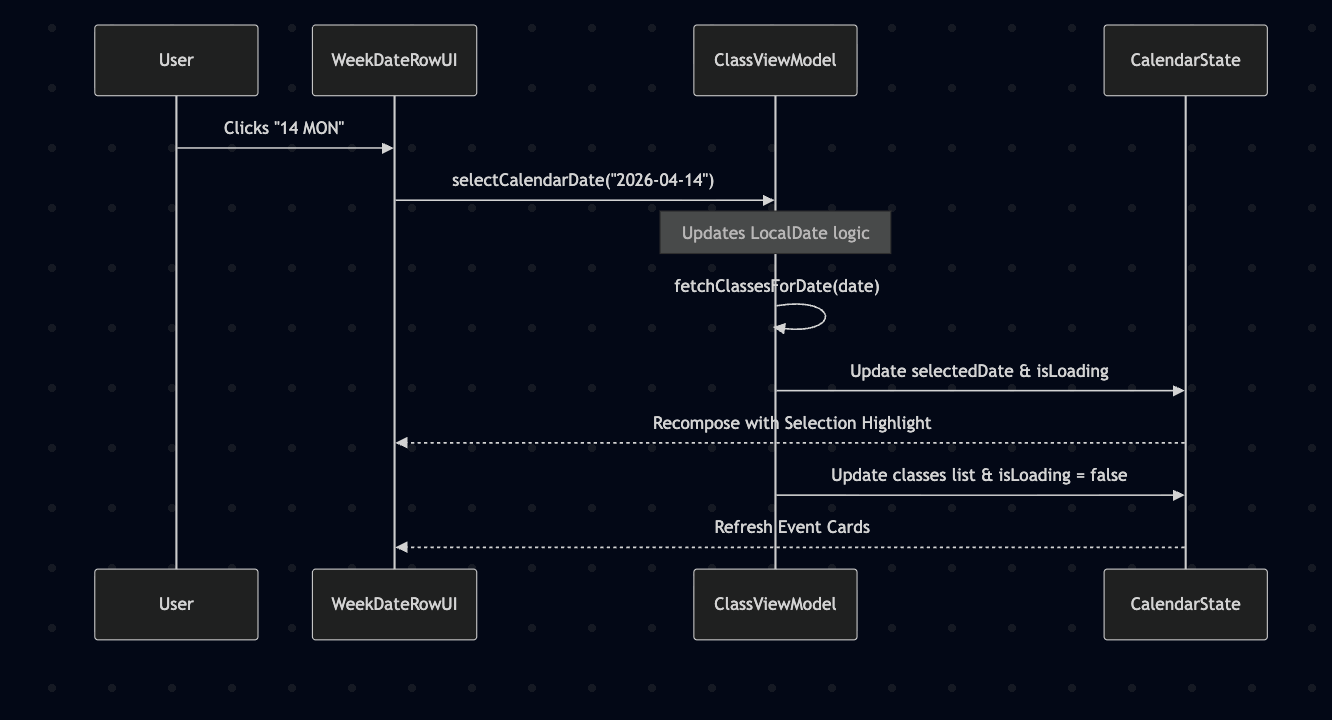
Low-Level Design (LLD)
Tech Stack
- Language: Kotlin
- UI Framework: Jetpack Compose
- Architecture: MVVM + Clean Architecture
- Dependency Injection: Hilt
- Asynchronous Logic: Coroutines & Flow
Challenges
- Dynamic Week Synchronization: Ensuring that selecting a date via the DatePicker correctly updates the horizontal “Week Date Row” and the “Week of” header simultaneously.
- Image Rendering: Handling Base64 strings for class images without causing UI lag or “jank” during list scrolling.
- Filtering Logic: Maintaining a smooth UX when multiple filters (Search + Instructor + Activity) are applied at once.
FAQ
1. Why use a custom Week Selector instead of a standard Calendar view?
To provide a more focused “Schedule” experience that highlights class availability per day, which is more intuitive for fitness or session-based booking.
2. How does the app handle empty states?
The module includes a conditional UI check that displays a “No classes for selected date” message and a CircularProgressIndicator during data fetching to keep the user informed.
3. Is the filtering done locally or on the server?
In this implementation, the ClassViewModel handles the filtering logic, allowing for near-instant UI updates as the user types or selects categories.
4. Can this module handle Dark Mode?
Yes. By utilizing UnitedGroovesTheme, all components like Surface, Card, and Text automatically adapt their color mapping based on the system’s UI mode.
Conclusion
The Calendar module for United Grooves demonstrates how modern Android tools like Jetpack Compose can be used to build complex, data-driven interfaces that remain clean, maintainable, and highly performant.